Cache volumes
Tuist runners can keep caches between jobs, so a fresh runner starts warm. Each job gets a private writable copy of the latest saved contents.
- Managed caches keep the Xcode compilation cache, Tuist's module cache and Gradle's caches with one step each. Tuist knows where each cache lives and keeps it within its storage.
- Custom volumes keep any other directory, such as a package manager's download cache, under a key you choose.
Add the steps after checkout and before the commands that use the caches. On runners that are not Tuist runners they do nothing, and a cache problem never fails the job: the step logs a warning and the job continues with an empty cache.
Managed caches#
The steps only decide where the caches live. Keep your existing cache setup:
tuist setup cache or the build settings that turn compilation caching on (see
the Xcode cache guide),
authentication for the module cache, and the
Tuist Gradle plugin for Gradle's remote build cache.
In GitLab CI, combine snippets with !reference, because extends replaces
before_script.
Xcode cache#
Keeps the store of Xcode's compilation cache on macOS runners.
jobs:
  build:
    runs-on: tuist-macos
    steps:
      - uses: actions/checkout@v4
      - uses: tuist/xcode-cache@v1
      - run: xcodebuild build -scheme App -destination 'generic/platform=iOS Simulator' COMPILATION_CACHE_ENABLE_CACHING=YES
steps:
  - label: Build
    agents:
      queue: tuist-macos
    plugins:
      - tuist/xcode-cache#v1: ~
    command: xcodebuild build -scheme App -destination 'generic/platform=iOS Simulator' COMPILATION_CACHE_ENABLE_CACHING=YES
include:
  - remote: https://raw.githubusercontent.com/tuist/xcode-cache-gitlab/v1/xcode-cache.yml

build:
  tags: [tuist-macos]
  before_script:
    - !reference [.tuist-xcode-cache, before_script]
  script:
    - xcodebuild build -scheme App -destination 'generic/platform=iOS Simulator' COMPILATION_CACHE_ENABLE_CACHING=YES
Module cache#
Keeps Tuist's local cache on macOS runners: module cache binaries, compiled manifests, plugins and selective testing results.
jobs:
  test:
    runs-on: tuist-macos
    permissions:
      contents: read
      id-token: write
    steps:
      - uses: actions/checkout@v4
      - uses: tuist/module-cache@v1
      - uses: jdx/mise-action@v4
      - run: tuist auth login
      - run: tuist install
      - run: tuist generate --no-open
      - run: tuist test
steps:
  - label: Test
    agents:
      queue: tuist-macos
    plugins:
      - tuist/module-cache#v1: ~
    command: |
      mise install
      tuist auth login
      tuist install
      tuist generate --no-open
      tuist test
include:
  - remote: https://raw.githubusercontent.com/tuist/module-cache-gitlab/v1/module-cache.yml

test:
  tags: [tuist-macos]
  before_script:
    - !reference [.tuist-module-cache, before_script]
  script:
    - mise install
    - tuist auth login
    - tuist install
    - tuist generate --no-open
    - tuist test
Gradle cache#
Keeps the caches and wrapper directories of Gradle's user home on Linux and
macOS runners: dependencies, transformed jars, compiled build scripts and
Gradle distributions. Set GRADLE_USER_HOME before the step if you use one,
and turn off other caching of those directories, such as cache: gradle on
actions/setup-java.
jobs:
  test:
    runs-on: tuist-linux
    steps:
      - uses: actions/checkout@v4
      - uses: actions/setup-java@v4
        with:
          distribution: temurin
          java-version: '21'
      - uses: tuist/gradle-cache@v1
      - run: ./gradlew test
steps:
  - label: Test
    agents:
      queue: tuist-linux
    plugins:
      - tuist/gradle-cache#v1: ~
    command: ./gradlew test
include:
  - remote: https://raw.githubusercontent.com/tuist/gradle-cache-gitlab/v1/gradle-cache.yml

test:
  tags: [tuist-linux]
  before_script:
    - !reference [.tuist-gradle-cache, before_script]
  script:
    - ./gradlew test
Custom volumes#
Choose a stable key and a path, then attach the volume before installing
dependencies. The path must be empty or absent. Remove any archive cache or
artifact restore that writes to the same directory. To keep several directories
in one volume, see
Several directories in one volume.
jobs:
  test:
    runs-on: tuist-linux
    steps:
      - uses: actions/checkout@v4
      - uses: tuist/cache-volume@v1
        with:
          key: npm
          path: ~/.npm
      - run: npm ci
      - run: npm test
steps:
  - label: Test
    agents:
      queue: tuist-linux
    plugins:
      - tuist/cache-volume#v1:
          volumes:
            - key: npm
              path: ~/.npm
    command: |
      npm ci
      npm test
test:
  tags: [tuist-linux]
  before_script:
    - tuist-cache-volume --key npm --path ~/.npm
  script:
    - npm ci
    - npm test
Several directories in one volume#
A volume can hold several directories. In GitHub Actions, list one path per
line; in Buildkite, set path to a list; in GitLab CI, pass --path once per
directory. Blank lines and surrounding whitespace are ignored.
jobs:
  lint:
    runs-on: tuist-linux
    steps:
      - uses: actions/checkout@v4
      - uses: tuist/cache-volume@v1
        with:
          key: python-tools
          path: |
            ~/.cache/pip
            ~/.cache/pre-commit
      - run: pip install pre-commit
      - run: pre-commit run --all-files
steps:
  - label: Lint
    agents:
      queue: tuist-linux
    plugins:
      - tuist/cache-volume#v1:
          volumes:
            - key: python-tools
              path:
                - ~/.cache/pip
                - ~/.cache/pre-commit
    command: |
      pip install pre-commit
      pre-commit run --all-files
lint:
  tags: [tuist-linux]
  before_script:
    - tuist-cache-volume --key python-tools --path ~/.cache/pip --path ~/.cache/pre-commit
  script:
    - pip install pre-commit
    - pre-commit run --all-files
- Shared capacity. All paths share the volume's capacity and are restored and saved together.
- Group small, related directories. Give a large or fast-changing directory its own volume.
- No nesting. Paths in one volume must not contain each other.
- Changing the list starts cold. Each path is stored in its own directory inside the volume, identified by how the path is written. Switching between one path and several, or adding, removing or rewriting a path, changes that layout: the first job after the change starts cold for the affected paths. Content of paths that are no longer listed stays in the volume until you delete it.
How keys work#
A key names a volume that changes over time; it is not the name of a fixed
snapshot like an actions/cache key.
- One volume per key. Each key is scoped to the repository (on Buildkite, the pipeline; on GitLab CI, the project), platform, CPU architecture and user. Every job that attaches it starts from the latest saved contents, and eligible jobs save their changes back to the same volume.
- Keep keys stable. Don't put versions or lockfile hashes in a key. With
actions/cache, a key likedeps-${{ hashFiles('Package.resolved') }}creates a new entry for each change, andrestore-keysfalls back to an older one. Here, a new key is a new, empty volume: the first job after every change starts cold, and the old volumes stay around until they expire. Keep the key and let your tool update the contents; package managers reuse whatever is still valid. - No partial matches. There are no restore keys. A key that hasn't been saved yet starts empty.
- Keys starting with
tuist-are reserved for Tuist's own caches and are rejected before the volume attaches. - Start over on purpose. Change the key, or delete the volume, when you want a job to start empty.
- Leave
tuist-keys to Tuist. The managed caches use keys that start withtuist-, so pick a different name for your own volumes.
On Linux, paths are mounted as ordinary directories, so tools can use their usual locations
such as deps, _build, and node_modules. Keep your normal .gitignore rules.
On macOS, paths are symlinks: use download caches such as ~/.npm;
node_modules and tools that replace their cache directory
are unsupported. Ignore workspace links without a trailing slash in .gitignore.
Saving changes#
The managed caches and custom volumes save the changes of successful jobs from your own repository, on any branch:
| Provider | Jobs that save changes |
|---|---|
| GitHub Actions | Push, schedule, manual dispatch and pull request jobs from the repository itself |
| Buildkite | Webhook and schedule builds of the pipeline's repository, including its pull requests |
| GitLab CI | Push, schedule and web pipelines of the project, and pipelines of its own merge requests when the connection has an API access token |
Other jobs can use the cache, but their changes are discarded. These include
fork pull requests, pull_request_target jobs, Buildkite builds started from
the API or the dashboard, GitLab merge requests from forks or without an API
access token, and tags. A job that doesn't change a volume leaves the saved
version in place. You can narrow which branches save on the runner profile; see
Choose which branches save.
Concurrent jobs work independently; changes from different jobs are not merged. Never cache credentials or irreplaceable data.
Choose which branches save#
You can change which branches save the managed caches and custom volumes. Open
Runners → Profiles, edit the profile your jobs use, and expand Save cache
from. Jobs use the profile they request: in runs-on: on GitHub Actions, as
the queue on Buildkite, or in tags: on GitLab CI. The settings apply to every
volume used by jobs on that profile, including volumes created later.
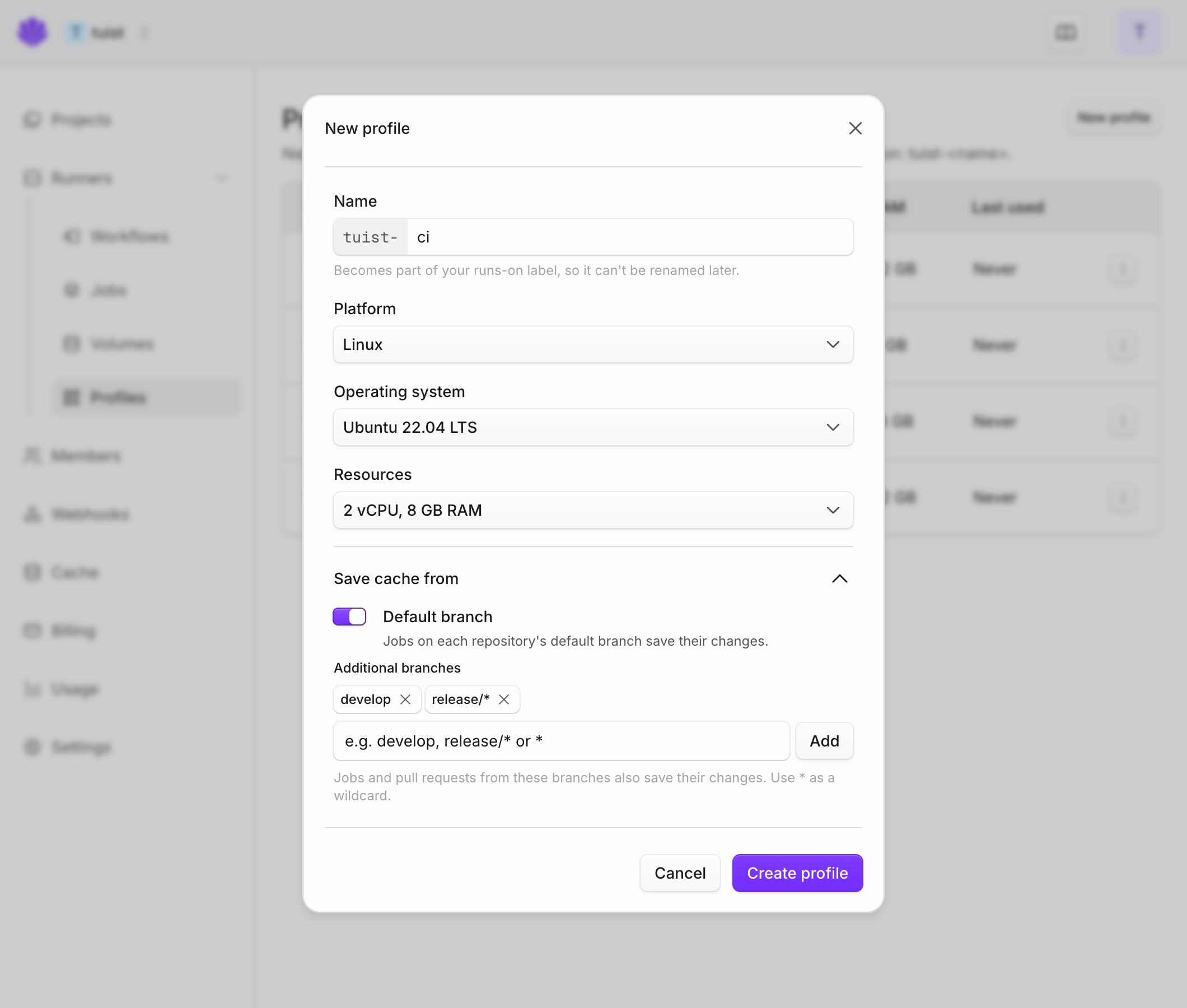
By default every successful job from the repository saves its changes. To save only from some branches, turn on Limit to specific branches:
- Default branch lets jobs on each repository's default branch save. Turn it off to save only from the additional branches.
- Under Additional branches, add up to 20 branch names that also save. Use
*as a wildcard:release/*matchesrelease/1.0.
The jobs listed in Saving changes save their changes when their branch matches. On GitHub Actions push and manual-dispatch runs, a tag with a matching name also matches.
Jobs on other branches can still use the cache, but their changes are discarded. Jobs that never save, such as fork pull requests, don't save on a matching branch either. Narrowing these settings or deleting the profile discards pending changes they no longer allow; a deleted profile falls back to saving from every branch.
Capacity and retention#
The Xcode cache starts at 30 GB. The module cache, the Gradle cache and
each custom volume start at 20 GB. Set a size to give a cache or volume
another capacity, a whole number of GB from 1gb to 100gb:
- uses: tuist/xcode-cache@v1
  with:
    size: 50gb
- uses: tuist/module-cache@v1
  with:
    size: 40gb
plugins:
  - tuist/xcode-cache#v1:
      size: 50gb
  - tuist/module-cache#v1:
      size: 40gb
build:
  variables:
    TUIST_XCODE_CACHE_SIZE: 50gb
    TUIST_MODULE_CACHE_SIZE: 40gb
The Gradle cache and custom volumes take the same size input
(TUIST_GRADLE_CACHE_SIZE and TUIST_VOLUME_SIZE in GitLab CI, --size for
tuist-cache-volume).
A larger size grows the volume, keeping its contents, from its next job. A
smaller one applies after the volume is next deleted or expires. When jobs ask
for different sizes of one cache, the largest applies, so declare each size in
one place.
All of them expire after 7 days without a job mount, and the next job starts with an empty volume after expiry. Tuist prunes the Xcode and module caches to fit their capacity, and the Gradle cache step has Gradle remove entries unused for seven days after every build.
Custom volumes do not prune old dependencies: use your tool's cleanup settings to keep them small. Writes to a full volume can fail the job. When saved contents reach 80% of the volume's capacity and a job runs out of space on them, the next job starts with an empty volume and its changes begin a new saved state.
Inspecting and deleting volumes#
Open Runners → Volumes to inspect used space, cache hit rate and job history. The Xcode, module and Gradle caches appear there too.
Account administrators can select Delete volume to remove a volume and its saved contents. Running jobs keep their private copies but cannot save them back, and the next job that uses the same key starts with an empty volume. Deleted volumes no longer appear in the list.
To delete a volume from a terminal or a workflow, look up its ID and pass it to
tuist runner volume delete:
tuist runner volume list --account my-org --name gradle-build-cache --json
tuist runner volume delete <volume-id> --account my-org --yes
The same operation is available through the
API as DELETE /api/accounts/{account_handle}/runners/volumes/{volume_id}
and through the MCP server as
delete_runner_volume. All of them require account administration or a token
with the account:runners:write scope.