Xcode build insights
Working on large projects should not require rebuilding the same code repeatedly. Tuist Build Insights lets you track build analytics so you can identify trends before local and CI build times become bottlenecks.
Build insights are driven by the tuist inspect build command, typically added to your scheme's post-action.
To start tracking local build times, you can leverage the tuist inspect build command by adding it to your scheme's post-action:
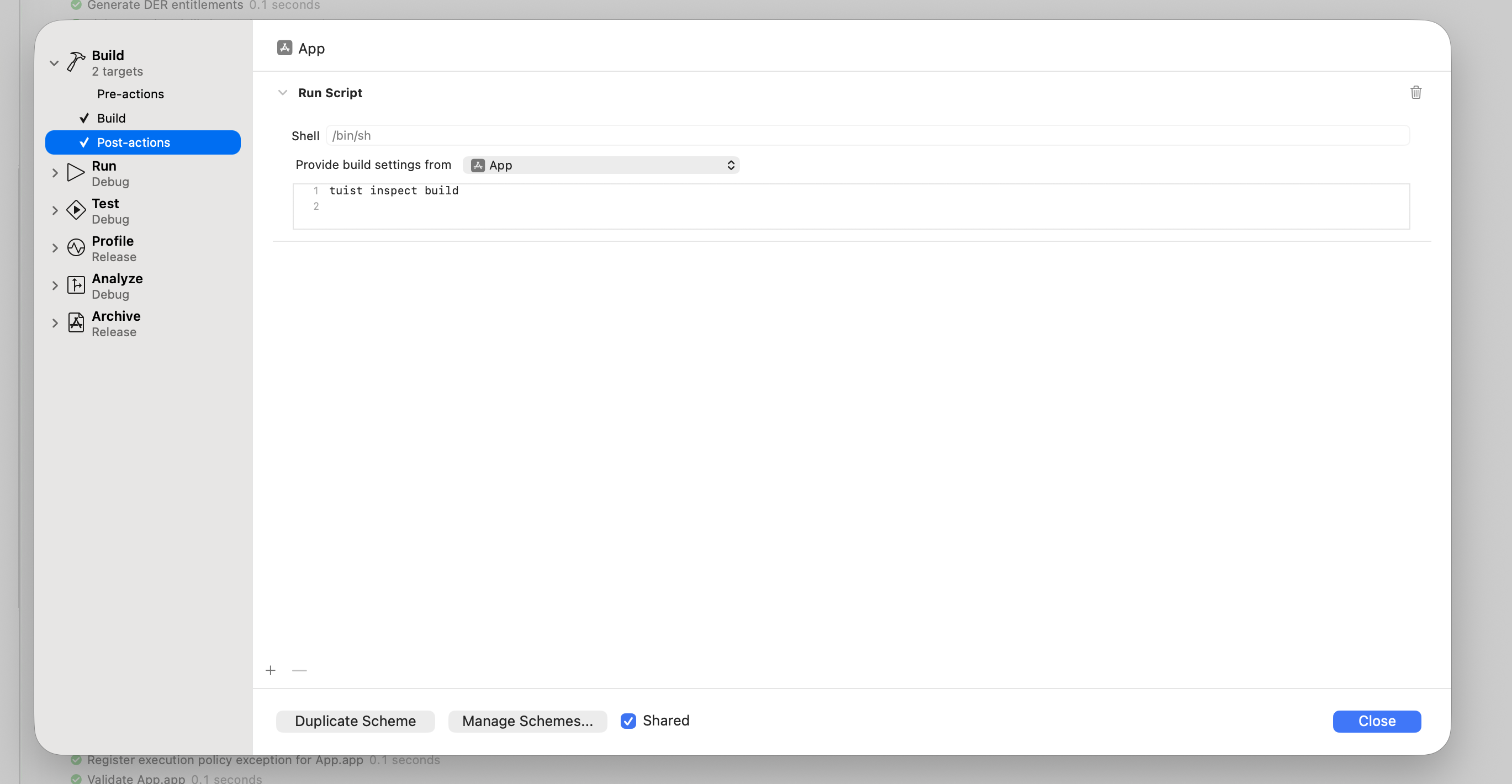
Set the "Provide build settings from" field to the executable or your main build target to capture build configuration.
The post-scheme action is not executed when the build fails.
You can execute it in that case by setting
runPostActionsOnFailuretoYESin the relevantproject.pbxprojBuildAction:<BuildAction buildImplicitDependencies="YES" parallelizeBuildables="YES" + runPostActionsOnFailure="YES">diff
For Mise, activate tuist in the post-action environment:
# -C ensures that Mise loads the configuration from the Mise configuration
# file in the project's root directory.
$HOME/.local/bin/mise x -C $SRCROOT -- tuist inspect build
Your environment's PATH is not inherited by the scheme post action, so use Mise's absolute path. This depends on how you installed Mise. Build settings should be inherited from a target so mise can run from $SRCROOT.
For Homebrew, add the Homebrew paths to the post-action environment:
export PATH="/opt/homebrew/bin:/usr/local/bin:$PATH"
tuist inspect build
Actor claims are disabled by default. To configure one for a scheme post-action, set TUIST_ACTOR_ID in that script rather than relying on shell exports. Xcode launched from the Dock does not inherit variables from ~/.zshrc. To explicitly suppress a configured claim with Homebrew, use:
export PATH="/opt/homebrew/bin:/usr/local/bin:$PATH"
export TUIST_ACTOR_ID=""
tuist inspect build
With Mise, override the value after Mise loads its environment:
$HOME/.local/bin/mise x -C "$SRCROOT" -- env TUIST_ACTOR_ID="" tuist inspect build
Use an explicit label instead of the empty value to opt in.
Once logged in, local builds are tracked and available from the Tuist dashboard:
To quickly access the dashboard, run tuist project show --web from the CLI.

Build Insights in CI#
To track build insights on CI, make sure CI is authenticated.
For Xcodebuild-driven CI you need to:
- Use
tuist xcodebuildwhen invokingxcodebuildactions. - Add
-resultBundlePathto yourxcodebuildcommand.
Without -resultBundlePath, required activity logs and result bundles are not generated and tuist inspect build cannot analyze the build.
Credential-free reporting on a private network#
A self-hosted deployment can allow developers to publish completed reports without signing in. An operator must configure TUIST_NETWORK_TRUSTED_INSIGHTS_ACCESS=true on the instance and restart it as described in the self-hosting guide. This applies to every supported project; there is no dashboard setting. Configure the self-hosted URL and project in the environment used by your scheme post-action or terminal. The CLI automatically discovers the instance policy when credentials are absent:
export TUIST_URL="https://tuist.internal.example"
tuist inspect build
# To publish local test results:
tuist inspect test
With genuinely absent credentials, activity logs and XCResult bundles are parsed locally and sent as structured reports. No raw archive, attachment, coverage/history upload, remote processor, shard reference, or selective-execution evidence is submitted. Reports remain visible but cannot update authenticated testcase state or drive quarantine/failure automations. Dashboards and other privileged commands still require sign-in. Keep cache integration disabled unless the instance separately enables network-trusted cache access or credentials are provisioned.
Present credentials remain authenticated. Invalid, corrupt, blank, or rejected-refresh credentials fail closed and remain on disk, so later commands do not silently become unsigned. Sign in again or explicitly sign out as a deliberate recovery action. Upgrade every server replica to a discovery-capable version before upgrading credential-free clients, and configure the final server URL without redirects. Older servers without discovery, disabled instances, and discovery failures still require authentication. No client-side opt-in is needed. Set TUIST_ACTOR_ID="" independently to omit the configured actor claim; verified credential identity is unaffected.
Machine metrics#
Build insights can include machine-level performance metrics (CPU, memory, network, and disk usage) captured during the build. To enable this, set up a lightweight background daemon that continuously samples system metrics:
tuist setup insights
This runs a local daemon that samples metrics in the background. The data is picked up automatically by tuist inspect build and uploaded with the build report.
Run tuist setup insights on your CI machines before building to capture machine metrics there as well.
To stop collecting machine metrics, run:
tuist teardown insights
This unloads the daemon's LaunchAgent, removes its plist, and deletes the sampled metrics and daemon logs from ~/.local/state, so nothing is left running in the background.
Report actor claim#
Report-creation requests include the optional x-tuist-actor-id header only when you explicitly set TUIST_ACTOR_ID to an organization-scoped label, for example TUIST_ACTOR_ID=employee-123 tuist inspect build. No label is sent by default, and Tuist does not detect operating-system usernames. An empty TUIST_ACTOR_ID omits the reported identifier but does not remove credential-based verified identity. Identifiers must be 1–128 bytes of non-space printable ASCII; invalid overrides are omitted without falling back. If a custom proxy rejects unfamiliar headers, opt out with the empty environment override.
Verified individual credentials take precedence; client-reported identifiers are otherwise shown as Unverified and never grant permissions or link automatically to users. Identifiers are visible to anyone who can view the project's reports, including public viewers when the project is public, and included in data exports, so do not include secrets. This applies to build, test, and command-event reports. Old servers ignore the optional header, and new servers accept old clients without it. New shared-token reports with no identifier show Unknown, rather than the publishing organization; historical reports retain their prior attribution. Build and test listings distinguish verified users from unverified reported identifiers. Authentication remains required unless the self-hosted instance explicitly enables credential-free reporting and the client discovers that policy.
Custom metadata#
You can attach metadata to builds with environment variables to improve filtering.
Environment variables#
| Variable | Format | Description |
|---|---|---|
TUIST_BUILD_TAGS | Comma-separated | Multiple tags in one variable. |
TUIST_BUILD_VALUE_* | Single value | Key-value pair where suffix is the key. |
Examples#
Set these values in CI or your shell before invoking your build:
export TUIST_BUILD_TAGS="nightly,ios-team,release-candidate"
export TUIST_BUILD_VALUE_TICKET="PROJ-1234"
export TUIST_BUILD_VALUE_PR_URL="https://github.com/myorg/myrepo/pull/123"