Generated Xcode project
As a project grows, running every test on every push stops scaling. Tuist's selective testing runs only the tests whose targets changed since the last successful test run, based on Tuist's hashing algorithm.
To run tests selectively with your generated project, use the tuist test command. The command hashes your project the same way it does for the module cache, and on success, it persists the hashes to determine what has changed in future runs. In future runs, tuist test transparently uses the hashes to filter down the tests and run only the ones that have changed since the last successful test run.
tuist test integrates directly with the module cache to use as many binaries from your local or remote storage to improve the build time when running your test suite. The combination of selective testing with module caching can dramatically reduce the time it takes to run tests on your CI.
If your test runs only target simulators, pass --destination simulator so tuist test uses and downloads only the simulator slices of cached binaries. See destination selection. Selective-testing hashes are the same for every --destination value.
Separate build and test jobs#
Selective testing supports separate build and test jobs. Run tuist test --build-only in the build job so Tuist can persist a selective-testing-graph.json file alongside the products the build emits. That graph carries the hashes selective testing needs, so the test job doesn't have to regenerate the project or resolve Swift Package dependencies to figure out which targets to run.
Tuist writes the graph in two places during --build-only:
- Inside the
.xctestproductsbundle when you pass-testProductsPath. - Next to every
.xctestrunfile under the derived data'sBuild/Products/directory.
Cache either output alongside the built products and hand the same path to --without-building in the test job. Both forms work:
# Build job — writes an .xctestproducts bundle with the graph inside it.
tuist test MyScheme \
  --build-only \
  -- \
  -testProductsPath artifacts/MyScheme.xctestproducts \
  -destination 'platform=iOS Simulator,id=SIMULATOR_IDENTIFIER'

# Test job — restores the same bundle.
tuist test MyScheme \
  --without-building \
  -- \
  -testProductsPath artifacts/MyScheme.xctestproducts \
  -destination 'platform=iOS Simulator,id=SIMULATOR_IDENTIFIER'
# Build job — writes the graph as a sibling of each xctestrun in derived data.
tuist test MyScheme \
  --build-only \
  -- \
  -derivedDataPath artifacts/derived-data

# Test job — points --without-building at any of those xctestrun files.
tuist test MyScheme \
  --without-building \
  -- \
  -derivedDataPath artifacts/derived-data \
  -destination 'platform=iOS Simulator,id=SIMULATOR_IDENTIFIER' \
  -xctestrun artifacts/derived-data/Build/Products/MyScheme_iphonesimulator.xctestrun
When Tuist can't find that graph next to the input (for example, when the build job used plain xcodebuild build-for-testing instead of tuist test --build-only), it falls back to regenerating the project so it can still compute the affected targets. That fallback needs Swift Package dependencies to be resolved on the test job, so run tuist install first or cache Tuist/.build between jobs.
The graph reflects the source tree as it was at build time. Run the test job against the same commit as the build job — if the source drifts between the two, the hashes no longer match the source and selective testing can skip tests that would actually fail against the newer source.
Which flag should I use?#
.xctestrun and .xctestproducts are two different Xcode output formats, and they trade off portability against pipeline convenience:
-testProductsPath(.xctestproducts) — recommended for new pipelines. It's a self-contained directory: the built.xctestbinaries and their.xctestrunfiles live inside it with paths made relative to the bundle root, so it stays valid wherever it ends up.-xctestrun(raw.xctestrun) — use it if you already have a pipeline built around derived data.xcodebuild build-for-testingwrites an.xctestrunat the top of<derivedData>/Build/Products/by default and points it at test bundles that live elsewhere in that tree. Reusing it in another job means keeping the paths inBuild/Products/intact.
If you're starting fresh, prefer -testProductsPath. If you're wiring Tuist into an existing pipeline that already caches derived data, -xctestrun gets the same fast path as long as the build job runs through tuist test --build-only.
Either input mode is mutually exclusive with -workspace/-project/-scheme, so Tuist skips those flags when the passthrough arguments include -xctestrun or -testProductsPath, and forwards the selected targets through -only-testing.
Due to the impossibility of detecting the in-code dependencies between tests and sources, the maximum granularity of the default selective testing is at the target level. The coverage strategy narrows it down to single tests. Therefore, we recommend keeping your targets small and focused to maximize the benefits of selective testing.
Coverage-based test selection#
Coverage-based test selection is in early access. Contact us to enable it for your account. Until it's enabled, the strategy behaves like the default selective testing.
By default, selective testing skips whole test targets whose hash already passed. The .coverage() strategy goes further: in the test targets left, it also skips the tests whose code coverage on an earlier run includes none of the files your change touched. It works with XCTest and XCUITest tests, and with Swift Testing tests in suites set up for it. Enable it in Tuist.swift:
import ProjectDescription

let tuist = Tuist(
    fullHandle: "{account-handle}/{project-handle}",
    testInsights: .testInsights(
        coverage: .coverage(upload: true),
        selectiveTesting: .selectiveTesting(strategy: .coverage())
    ),
    project: .tuist()
)
The strategy requires:
- Coverage uploads. Tuist selects tests by the coverage that earlier runs uploaded, so
tuist testfails to load a manifest that sets.coverage()withupload: false. - TestCoverageAttribution 0.5.1 or later linked by your test targets. It records which files each test executes and skips the tests Tuist didn't select. A target without it is only ever skipped whole, as with the default.
- Full test runs, often enough. A run with
tuist test --no-selective-testingexecutes every test and becomes a baseline. A selective run compares against a recent one in its commit's history on the same platform, and applies no coverage without one. Where and how often to run them depends on how your team works, such as on every commit of your default branch, nightly, or on release branches. We recommend the default branch: a full run there also catches, before a change ships, what coverage can't see, such as a fixture or a service a test depends on.
With the strategy on, tuist test skips the targets whose hash already passed, then asks Tuist which tests of the remaining targets your change can affect. Targets with no affected test aren't built. New tests, tests that failed last time, tests in a changed test file, and tests without recorded coverage always run.
Sometimes coverage isn't applied, and the output says why: every test of the targets whose hash didn't pass runs, as with the default selective testing. That happens without a recent baseline on the same platform, when the change touches more than 5,000 files, or when a file that can affect any test changed, such as Package.resolved, Project.swift, or an .xcconfig. To run every test, pass --no-selective-testing.
Coverage tools that read a single run's report, Xcode's included, assume the whole test suite ran, so a selective run's report leaves out the tests it skipped. Tuist's code coverage carries the coverage of skipped test targets forward from an earlier run instead, using the target-level coverage it records on every run.
Linking TestCoverageAttribution#
Add the package to Tuist/Package.swift, pinned to its minor version, since a 0.x minor release can change what it records:
import PackageDescription

let package = Package(
    name: "MyApp",
    dependencies: [
        .package(
            url: "https://github.com/tuist/TestCoverageAttribution",
            .upToNextMinor(from: "0.5.1")
        ),
    ]
)
Then add it to your test targets, and never to an app target:
.target(
    name: "CheckoutTests",
    destinations: .iOS,
    product: .unitTests,
    bundleId: "dev.tuist.CheckoutTests",
    sources: ["CheckoutTests/**"],
    dependencies: [
        .target(name: "Checkout"),
        .external(name: "TestCoverageAttribution"),
    ]
)
Tuist links packages as static frameworks by default. An XCTest-only target references nothing in the package, so the linker drops it, and with it the recording and the skipping. Either add -ObjC to the test target's OTHER_LDFLAGS, or link the package dynamically in Tuist/Package.swift:
#if TUIST
    import ProjectDescription

    let packageSettings = PackageSettings(
        productTypes: ["TestCoverageAttribution": .framework]
    )
#endif
Swift Testing#
Swift Testing has no observation API a library can join, so its tests need TestCoverageAttribution's .coverageAttribution trait on their suite. The trait applies to the suites nested in the one that has it. Tests in suites without it record no per-test coverage, so they run whenever their target runs.
import TestCoverageAttribution
import Testing

@Suite(.coverageAttribution)
struct DiscountTests {
    @Test func appliesDiscount() { … }
}
- Tests must not overlap. Swift Testing runs a process's tests in parallel by default, and coverage counters can't tell tests that run at the same time apart, so those tests record no coverage of their own and always run.
.serializedonly orders a suite's own tests, so it's enough only when the target has a single suite. XCTest needs nothing: parallel testing runs each test clone in its own process. - Turn parallelization off per test target. Xcode applies the setting to each test target, so you can turn it off only for the targets you want selected test by test, and the scheme's other targets keep running in parallel. No separate scheme is needed. Set it on the testable target,
.testableTarget(target: "CheckoutTests", parallelization: .disabled), which also runs that target's XCTest tests without clones. Schemes Tuist generates take it from the project'stestingOptions, off unless they include.parallelizableor.swiftTestingOnlyParallelizable. Passing-parallel-testing-enabled YESorNOtotuist testoverrides every target's setting for that run. - Skipping needs Swift 6.3 (Xcode 26.4) or later. The trait cancels the tests Tuist didn't select and reports them as skipped. With earlier versions, the tests still record coverage, but the ones Tuist didn't select run anyway.
Tests that always run#
Coverage only sees the code a test executes. A test whose real inputs are fixtures, resources, the network, or the environment can break without any covered code changing. Mark it unskippable and it runs even when Tuist doesn't select it:
// Swift Testing: on a test or a suite.
// `.skippable` opts a nested test or suite back in.
@Suite(.coverageAttribution, .unskippable)
struct FixtureTests {
    @Test func parsesTheFixtures() { … }
}

// XCTest: list the class's tests, or set `isUnskippable` for all of them.
final class NetworkTests: XCTestCase {
    @objc static let unskippableTests = ["testParsesTheFixtures"]
}
It only applies in test targets that run. A target whose hash already passed, or none of whose tests Tuist selected, is skipped whole and never starts, so its unskippable tests don't run either.
See the TestCoverageAttribution README for every option.
Inspecting a selection#
The test run's Selective Testing tab shows what coverage selected and why. The same data is available from the CLI, with --json for scripting, and to agents through the Model Context Protocol server:
tuist test list --selective-testing coverage           # the runs coverage-based selection decided
tuist test show <test-run-id>                          # a run's strategy, baseline and test counts
tuist test selective-testing list <test-run-id>        # each test selected or skipped, with its reason and the file that matched
tuist test selective-testing changed-files <test-run-id>  # the files that changed since the baseline
tuist test case run show <test-case-run-id>            # why a test ran
When coverage isn't applied, the tests still count as a coverage-based selection: their reason says why coverage couldn't decide, such as tracked_file_changed.
Pull/merge request comments#
To get automatic pull/merge request comments, integrate your Tuist project with a Git forge: GitHub, Cursor Origin, or Entire.
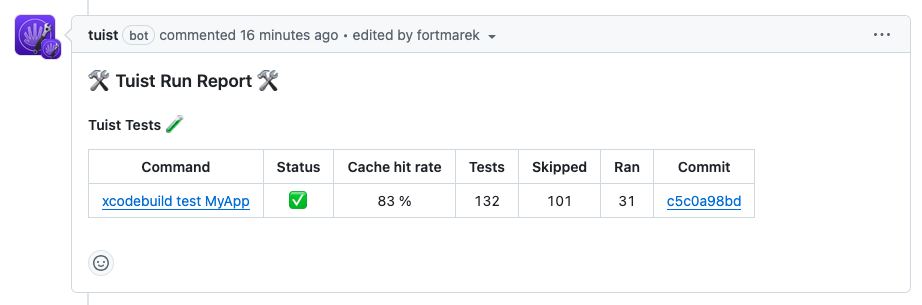
Once your Tuist project is connected with your Git platform such as GitHub, and you start using tuist test as part of your CI workflow, Tuist will post a comment directly in your pull/merge requests, including which tests were run and which skipped:
Investigating misses on the dashboard#
When a previously cached test target shows up as a miss, the Selective Testing tab on a test run page lets you drill into the inputs that produced the hash. Expanding a row reveals the per-component subhashes — sources, dependencies, environment variables, project and target settings, Info.plist, entitlements, headers, and so on — so you can pinpoint the input that drifted between runs.
Use the Copy as JSON button at the top of the Selective Testing card to export every selective testing target with its hash and subhashes. Comparing the JSON between two runs is the fastest way to confirm which input changed when the test target's hash drifted.