Аналитика сборок Xcode
Работа над крупными проектами не должна требовать многократной пересборки одного и того же кода. Tuist Build Insights позволяет отслеживать аналитику сборок, чтобы вы могли выявлять тенденции до того, как время локальных сборок и сборок в CI станет узким местом.
Аналитика сборок формируется командой tuist inspect build, которую обычно добавляют в пост-действие схемы.
Чтобы начать отслеживать время локальных сборок, используйте команду tuist inspect build, добавив её в пост-действие схемы:
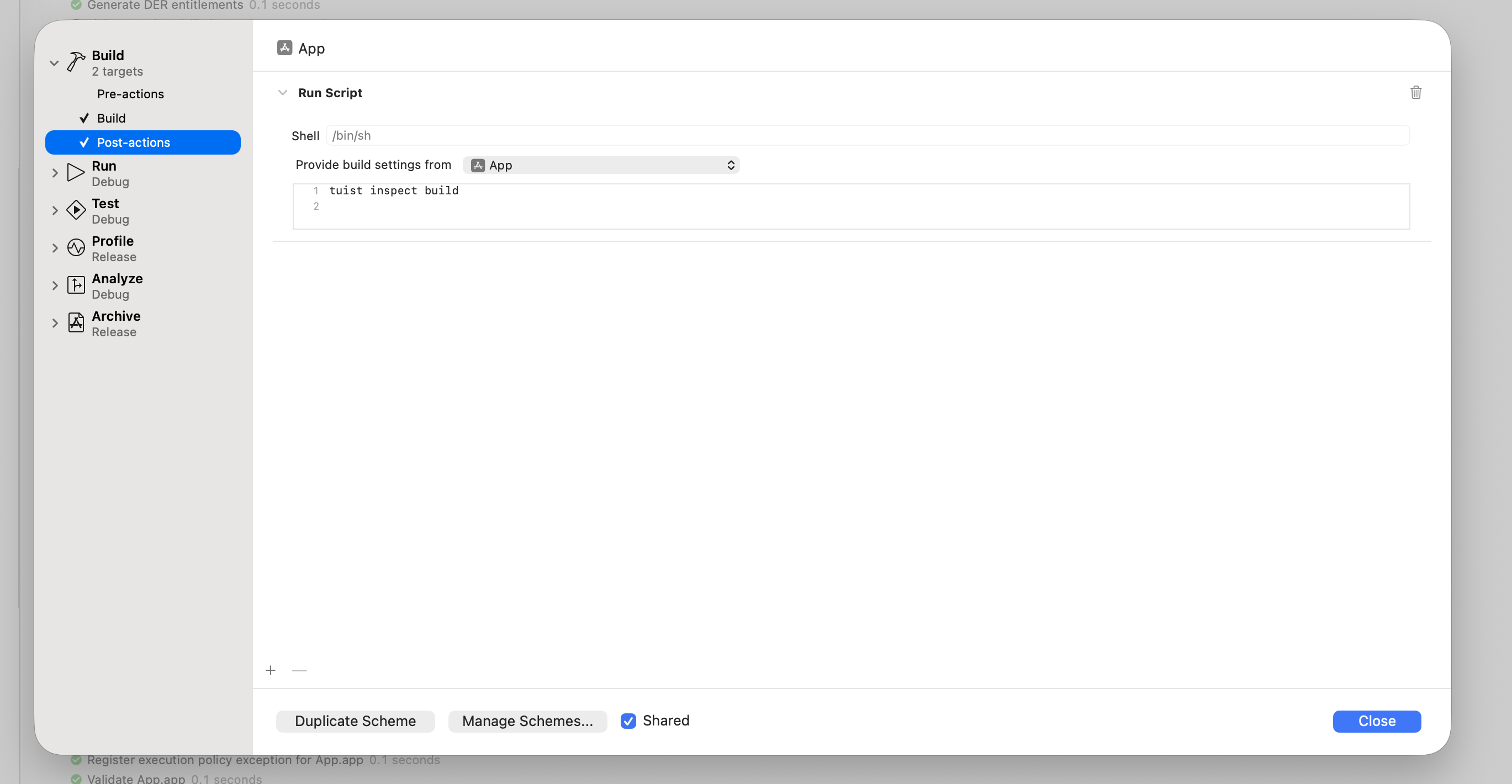
Установите поле «Предоставить настройки сборки из» на исполняемый файл или вашу основную цель сборки, чтобы захватить конфигурацию сборки.
Пост-действие схемы не выполняется, если сборка завершается ошибкой.
В этом случае вы можете выполнить его, установив
runPostActionsOnFailureв значениеYESв соответствующем разделеproject.pbxprojBuildAction:<BuildAction buildImplicitDependencies="YES" parallelizeBuildables="YES" + runPostActionsOnFailure="YES">diff
Для Mise активируйте tuist в окружении пост-действия:
# -C ensures that Mise loads the configuration from the Mise configuration
# file in the project's root directory.
$HOME/.local/bin/mise x -C $SRCROOT -- tuist inspect build
Переменная PATH вашего окружения не наследуется пост-действием схемы, поэтому используйте абсолютный путь к Mise. Это зависит от способа установки Mise. Настройки сборки должны наследоваться от цели, чтобы mise мог запускаться из $SRCROOT.
Для Homebrew добавьте пути Homebrew в окружение пост-действия:
export PATH="/opt/homebrew/bin:/usr/local/bin:$PATH"
tuist inspect build
Заявки актора по умолчанию отключены. Чтобы настроить их для пост-действия схемы, задайте TUIST_ACTOR_ID в этом скрипте вместо reliance на экспорт переменных оболочки. Xcode, запущенный из Dock, не наследует переменные из ~/.zshrc. Чтобы явно подавить настроенную заявку при использовании Homebrew, используйте:
export PATH="/opt/homebrew/bin:/usr/local/bin:$PATH"
export TUIST_ACTOR_ID=""
tuist inspect build
При использовании Mise переопределите значение после загрузки окружения Mise:
$HOME/.local/bin/mise x -C "$SRCROOT" -- env TUIST_ACTOR_ID="" tuist inspect build
Используйте явную метку вместо пустого значения, чтобы включить функцию.
После входа в систему локальные сборки отслеживаются и доступны в панели управления Tuist:
Чтобы быстро открыть панель управления, выполните tuist project show --web из CLI.

Аналитика сборок в CI#
Чтобы отслеживать аналитику сборок в CI, убедитесь, что CI аутентифицирован.
Для CI, управляемого xcodebuild, необходимо:
- Использовать
tuist xcodebuildпри вызове действийxcodebuild. - Добавьте
-resultBundlePathв вашу командуxcodebuild.
Без -resultBundlePath необходимые журналы активности и пакеты результатов не создаются, и tuist inspect build не может проанализировать сборку.
Отправка отчетов без учетных данных в частной сети#
Самостоятельно размещаемое развертывание может позволить разработчикам публиковать готовые отчеты без входа в систему. Оператор должен настроить TUIST_NETWORK_TRUSTED_INSIGHTS_ACCESS=true на экземпляре и перезапустить его, как описано в руководстве по самостоятельному размещению. Это применяется ко всем поддерживаемым проектам; настройки в панели управления нет. Настройте URL самостоятельно размещаемого сервера и проект в окружении, используемом вашим пост-действием схемы или терминалом. CLI автоматически обнаруживает политику экземпляра при отсутствии учетных данных:
export TUIST_URL="https://tuist.internal.example"
tuist inspect build
# To publish local test results:
tuist inspect test
При полном отсутствии учетных данных журналы активности и пакеты XCResult анализируются локально и отправляются в виде структурированных отчетов. Не отправляются необработанные архивы, вложения, данные покрытия/истории, удаленные процессоры, ссылки на шарды или доказательства выборочного выполнения. Отчеты остаются видимыми, но не могут обновлять состояние аутентифицированных тестовых случаев или запускать автоматизацию карантина/сбоев. Для доступа к панелям управления и другим привилегированным командам все еще требуется вход. Оставьте интеграцию кэша отключенной, если экземпляр отдельно не включает доступ к кэшу с доверием к сети или не предоставлены учетные данные.
Текущие учетные данные остаются аутентифицированными. Недействительные, поврежденные, пустые или отклоненные при обновлении учетные данные приводят к безопасному отказу и остаются на диске, поэтому последующие команды не становятся неявно не подписанными. Войдите снова или явно выйдите из системы как преднамеренное действие восстановления. Обновите каждую реплику сервера до версии, поддерживающей обнаружение, перед обновлением клиентов без учетных данных и настройте финальный URL сервера без перенаправлений. Старые серверы без обнаружения, отключенные экземпляры и сбои обнаружения все еще требуют аутентификации. Опция на стороне клиента не нужна. Установите TUIST_ACTOR_ID="" независимо, чтобы опустить настроенную заявку актора; проверенная идентичность учетных данных не затрагивается.
Метрики машины#
Аналитика сборок может включать метрики производительности на уровне машины (ЦП, память, сеть и использование диска), собираемые во время сборки. Чтобы включить это, настройте легкий фоновый демон, который постоянно собирает системные метрики:
tuist setup insights
Это запускает локальный демон, который собирает метрики в фоновом режиме. Данные автоматически подхватываются командой tuist inspect build и загружаются вместе с отчетом о сборке.
Выполните tuist setup insights на ваших машинах CI перед сборкой, чтобы также собрать метрики машины.
Чтобы прекратить сбор метрик машины, выполните:
tuist teardown insights
Это выгружает LaunchAgent демона, удаляет его plist и удаляет собранные метрики и логи демона из ~/.local/state, так что ничего не остается работать в фоновом режиме.
Заявка актора отчета#
Запросы на создание отчетов включают необязательный заголовок x-tuist-actor-id только тогда, когда вы явно устанавливаете TUIST_ACTOR_ID в метку, ограниченную организацией, например TUIST_ACTOR_ID=employee-123 tuist inspect build. По умолчанию метка не отправляется, и Tuist не определяет имена пользователей операционной системы. Пустое значение TUIST_ACTOR_ID опускает сообщаемый идентификатор, но не удаляет проверенную идентичность на основе учетных данных. Идентификаторы должны состоять из 1–128 байтов печатных символов ASCII, кроме пробела; недопустимые переопределения опускаются без возврата к предыдущему значению. Если пользовательский прокси отвергает неизвестные заголовки, откажитесь от них с помощью пустого переопределения окружения.
Проверенные индивидуальные учетные данные имеют приоритет; иначе идентификаторы, сообщенные клиентом, отображаются как Непроверенные и никогда не предоставляют разрешения и не связываются автоматически с пользователями. Идентификаторы видны всем, кто может просматривать отчеты проекта, включая публичных зрителей, если проект публичный, и включаются в экспорт данных, поэтому не включайте секреты. Это относится к отчетам о сборках, тестах и событиях команд. Старые серверы игнорируют необязательный заголовок, а новые серверы принимают старых клиентов без него. Новые отчеты с общим токеном без идентификатора показывают Неизвестно, а не публикующую организацию; исторические отчеты сохраняют свою предыдущую атрибуцию. В списках сборок и тестов проверяемые пользователи отличаются от непроверенных сообщаемых идентификаторов. Аутентификация остается обязательной, если самостоятельно размещенный экземпляр явно не включает отчетность без учетных данных и клиент не обнаруживает эту политику.
Пользовательские метаданные#
Вы можете прикреплять метаданные к сборкам с помощью переменных окружения, чтобы улучшить фильтрацию.
Переменные окружения#
| Переменная | Формат | Описание |
|---|---|---|
TUIST_BUILD_TAGS | Разделено запятыми | Несколько тегов в одной переменной. |
TUIST_BUILD_VALUE_* | Одно значение | Пара «ключ-значение», где суффикс является ключом. |
Примеры#
Установите эти значения в CI или в оболочке перед запуском сборки:
export TUIST_BUILD_TAGS="nightly,ios-team,release-candidate"
export TUIST_BUILD_VALUE_TICKET="PROJ-1234"
export TUIST_BUILD_VALUE_PR_URL="https://github.com/myorg/myrepo/pull/123"