Xcode 測試分析
Tuist Test Insights 提供 Xcode 測試分析,讓你透過識別緩慢的測試或快速了解失敗的 CI 運行來監控測試套件的狀況。隨著你的測試套件增長,越來越難發現如逐漸變慢的測試或間歇性失敗等趨勢。Tuist Test Insights 為你提供所需的可見性,以維持快速且可靠的測試套件。
使用 Test Insights,你可以回答以下問題:
- 我的測試是否變慢了?哪些測試?
- 哪些測試不穩定且需要關注?
- 為什麼我的 CI 運行失敗了?
設定#
要開始追蹤你的測試,你可以利用 tuist inspect test 指令,將其加入至你 scheme 的測試後置動作中:
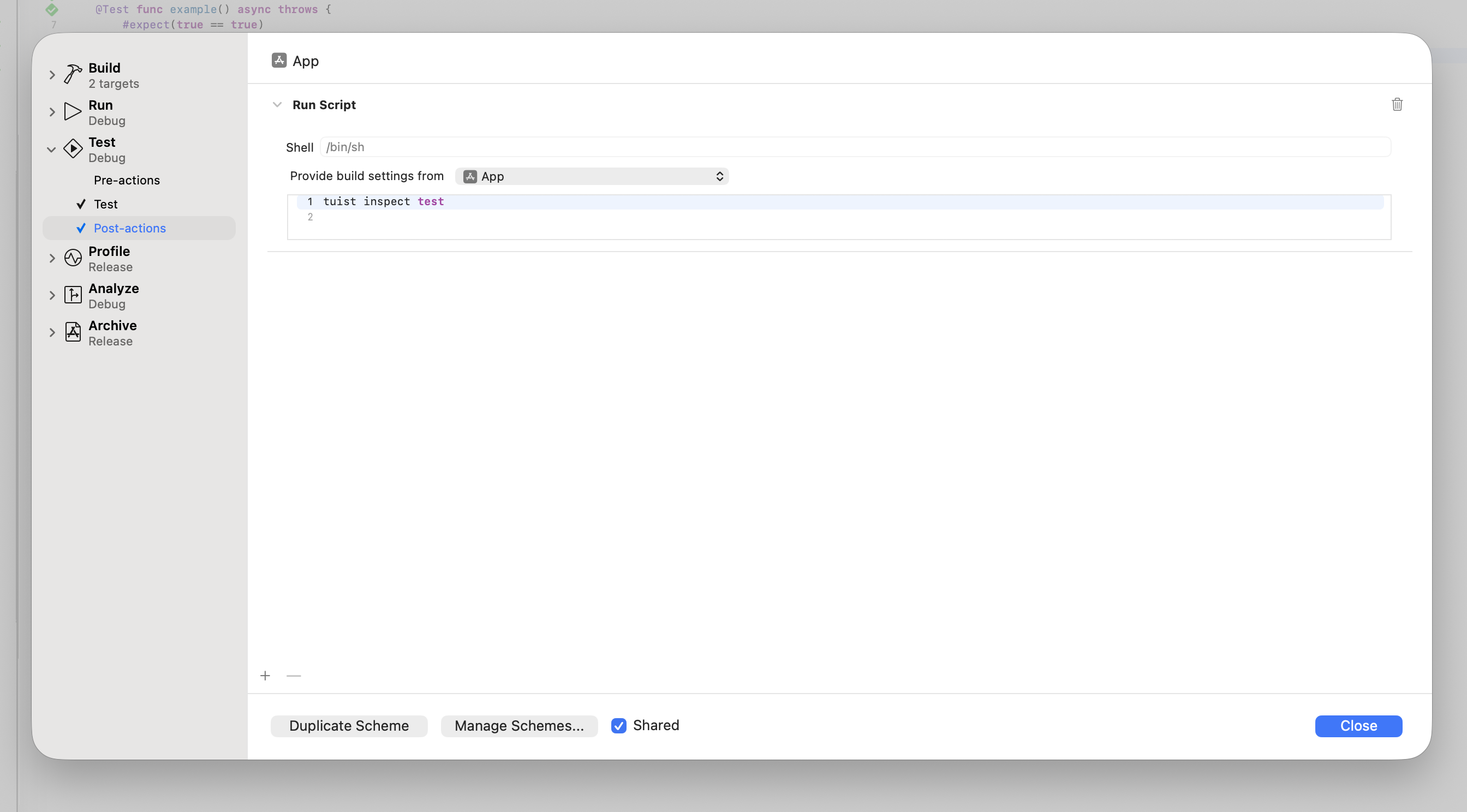
如果你使用 Mise,你的腳本需要在後置動作環境中啟用 tuist:
# -C ensures that Mise loads the configuration from the Mise configuration
# file in the project's root directory.
$HOME/.local/bin/mise x -C $SRCROOT -- tuist inspect test
你環境中的 PATH 環境變數不會被 scheme 後置動作繼承,因此你必須使用 Mise 的絕對路徑,這取決於你如何安裝 Mise。此外,別忘了從專案中的目標繼承建置設定,以便你能在 $SRCROOT 指向的目錄中執行 Mise。
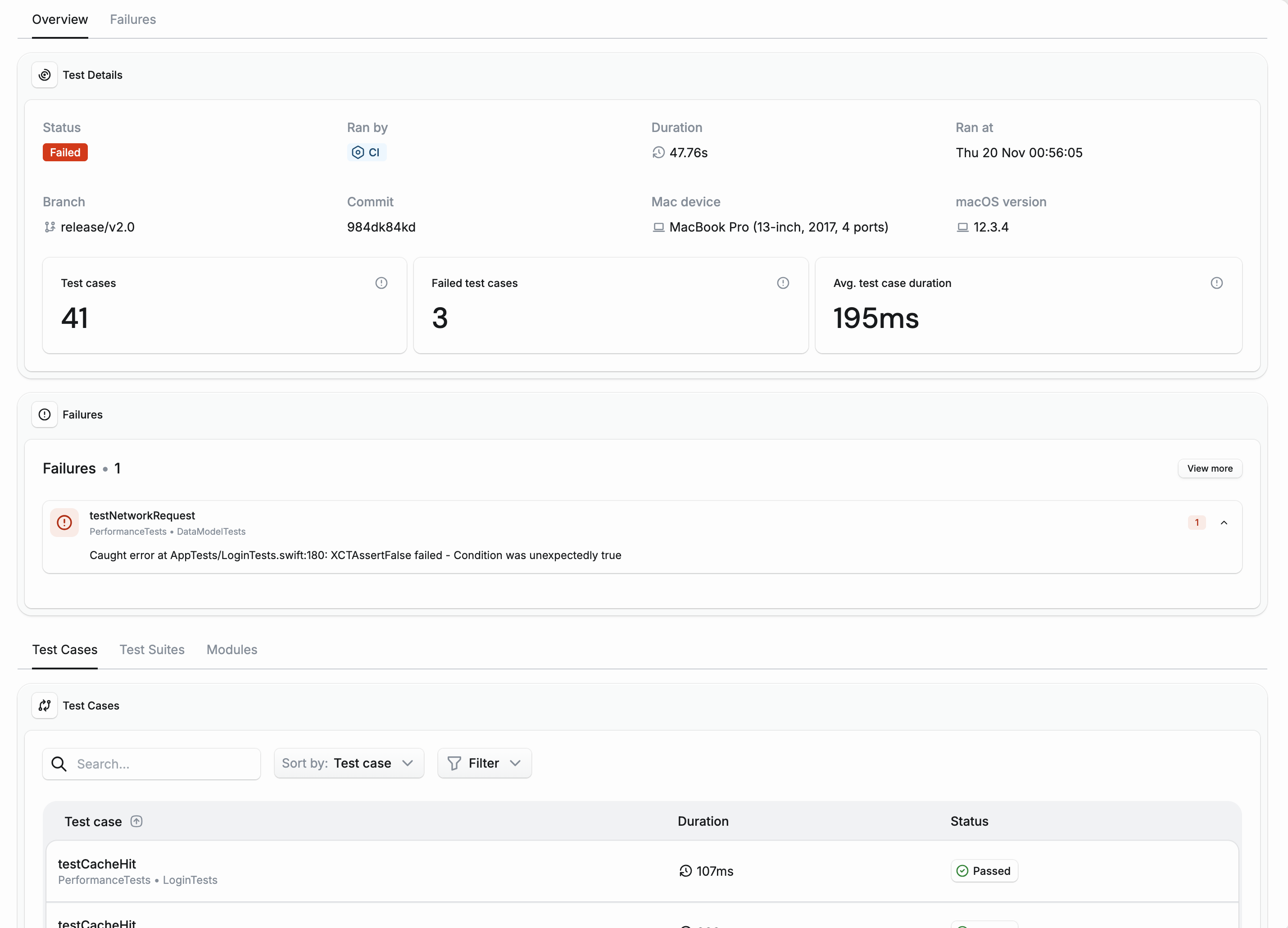
只要你登入 Tuist 帳戶,你的測試運行就會被追蹤。你可以在 Tuist 儀表板中存取你的測試分析,並查看它們隨時間的變化:

除了整體趨勢外,你也可以深入檢視每個單獨的測試,例如在 CI 上除錯失敗或緩慢的測試時:
產生的專案#
自動產生的 scheme 會自動包含 tuist inspect test 後置動作。
如果你不想在自動產生的 scheme 中追蹤測試分析,請使用 testInsightsDisabled 產生選項來停用它們。
如果你使用帶有自訂 scheme 的產生專案,你可以為測試分析設定後置動作:
let project = Project(
    name: "MyProject",
    targets: [
        // Your targets
    ],
    schemes: [
        .scheme(
            name: "MyApp",
            shared: true,
            buildAction: .buildAction(targets: ["MyApp"]),
            testAction: .testAction(
                targets: ["MyAppTests"],
                postActions: [
                    // Test insights: Track test duration and flakiness
                    .executionAction(
                        title: "Inspect Test",
                        scriptText: """
                        $HOME/.local/bin/mise x -C $SRCROOT -- tuist inspect test
                        """,
                        target: "MyAppTests"
                    )
                ]
            ),
            runAction: .runAction(configuration: "Debug")
        )
    ]
)
如果你不使用 Mise,你的腳本可以簡化為:
testAction: .testAction(
    targets: ["MyAppTests"],
    postActions: [
        .executionAction(
            title: "Inspect Test",
            scriptText: "tuist inspect test"
        )
    ]
)
持續整合#
要在 CI 上追蹤測試分析,你需要確保你的 CI 已 通過驗證。
此外,你需要:
- 在叫用
xcodebuild動作時使用tuist xcodebuild指令。 - 將
-resultBundlePath加入至你的xcodebuild叫用中。
當 xcodebuild 測試你的專案而沒有 -resultBundlePath 時,不會產生所需的结果捆綁檔案。tuist inspect test 後置動作需要這些檔案來分析你的測試。
Git 歷史記錄#
在 CI 上,Tuist 也會上傳 checkout 的提交歷史記錄:提交 SHA、其父節點、提交日期,以及運行及其拉取請求基礎分支所在的分支。不會上傳任何檔案內容、提交訊息或作者資訊。這讓 Tuist 知道哪些提交已合併到你的預設分支,例如合併佇列測試過的提交。Tuist 會讀取 checkout 已有的歷史記錄,當 checkout 沒有基礎分支時,會向遠端詢問其最新提交(git ls-remote)。除了程式碼涵蓋率之外,它不會抓取歷史記錄。
| 變數 | 效果 |
|---|---|
TUIST_GIT_UPLOAD_ENABLED=false |
不會讀取或上傳任何 Git 歷史記錄。 |
TUIST_GIT_UNSHALLOW_ENABLED=false |
僅讀取 checkout,而不聯絡遠端。 |