Xcode and Gradle: Two worlds, one infrastructure
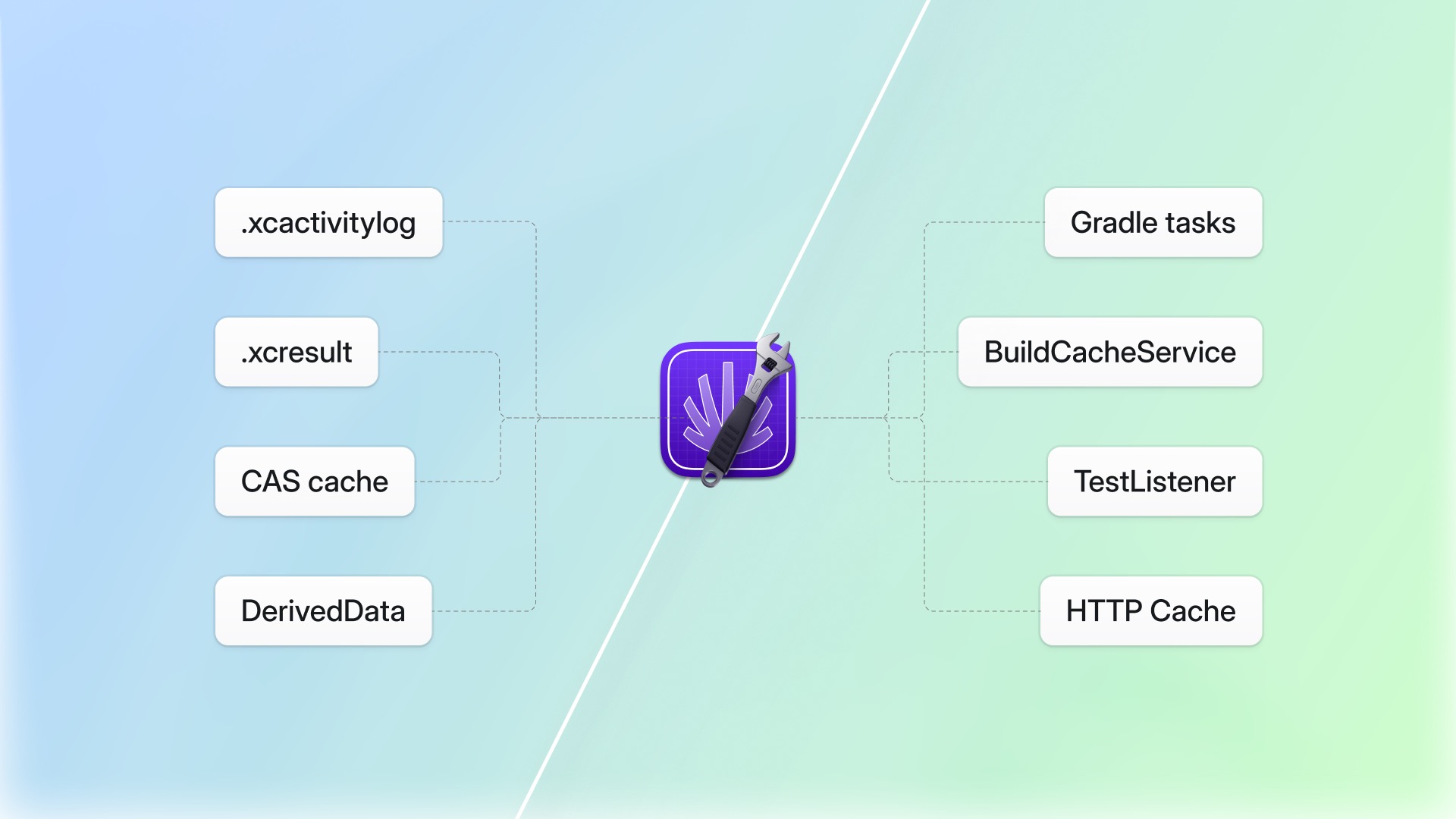
At Tuist, we are building a virtual platform team. Not every organization can afford a dedicated team to optimize builds, manage flaky tests, track app size, or streamline developer workflows. Tuist fills that role by going deep into build systems, understanding how they structure and persist data, and plugging into them to optimize workflows like compilations and test runs. Whether developers work alone or alongside coding agents, we want the tooling layer to just work.
We have been doing this for Xcode for years. Understanding activity logs, result bundles, compilation graphs, the entire landscape of how Apple's toolchain turns source files into apps. Being close to the mobile ecosystem, jumping to Android through Gradle was a natural next step. And we were genuinely struck by how the work turned out. We shipped remote build caching, build insights, test insights, flaky test detection, bundle analysis, and previews for Gradle in about three weeks. Part of that speed came from features like bundle analysis and test insights being largely build-system-agnostic: once the data is extracted, it boils down to the same structures regardless of whether it came from Xcode or Gradle.
This post is a walkthrough of both build systems from our perspective. If you are an Xcode developer curious about how things work on the Gradle side, or a Gradle developer who has never touched Apple's toolchain, this is for you.
The plugin model, or lack thereof
Gradle is Android's build system, and more broadly, the dominant build system in the JVM ecosystem. If you have never used it: think of it as a programmable build system where builds are defined in Kotlin or Groovy scripts, and the system is designed from the ground up to be extended. It exposes a rich plugin API where you can hook into nearly every phase of the build lifecycle. You implement an interface, register your plugin, and Gradle calls you at the right time. Want to intercept cache operations? Implement BuildCacheService. Want to observe every task as it finishes? Register an OperationCompletionListener. Want test results as they happen? Add a TestListener. The contracts are well-defined, documented, and stable.
Xcode is Apple's IDE for iOS, macOS, and the rest of Apple's platforms. The underlying build system is Swift Build, and xcodebuild is the command-line executable bundled with Xcode to interact with projects from the terminal, for example to build them. If you come from the Gradle world: think of it as a more closed system where Apple controls both the IDE and the build pipeline, and there is no plugin model to speak of. Apple does not expose a way to say "call me when a compilation finishes" or "let me handle cache storage." Swift Build is open source now, but it is strongly coupled to Xcode and its release cycles. The same applies to SwiftPM, Apple's package manager: you can contribute improvements or fixes, but they will not reach developers until Apple ships the next Xcode version. In practice, you feed the build system a project in its intermediate format (PIF, or Project Interchange Format) and it gives you output in the terminal and artifacts on disk. There are no extension points in between.
This single architectural difference shaped everything about how we built our integrations. With Gradle, we wrote a plugin in Kotlin that hooks directly into the build lifecycle. With Xcode, we had to get creative. We built a CLI that wraps xcodebuild (Apple's command-line build tool), parses its artifacts after the fact, hooks into scheme post-actions to trigger data collection, and in some cases acts as a proxy between the build system and external services. Every feature required finding the right phase in the process where the data we needed was accessible.
Build caching
Build caching is about not repeating work that has already been done. If a module or a compilation unit has not changed since the last build, there is no reason to compile it again. And if someone else on your team or CI has already compiled it, there is no reason for you to compile it either. The idea is simple, but the integration looks completely different depending on the build system.
For most of Xcode's history, there was no concept of remote build caching. So we built one ourselves.
In the early days of Tuist, we invested heavily in project generation. For context: Xcode projects are stored as .xcodeproj files, a format that is notoriously difficult to manage at scale and causes constant merge conflicts in teams. Tuist lets you define your project in Swift and generates the Xcode project from that definition. Later, drawing ideas from package managers like Carthage (a dependency manager for Apple platforms that builds frameworks from source), we built module-level binary caching on top of it. You can see how this looks in practice on our own project's cache dashboard. Because we understand the project graph, we can determine which modules have not changed, replace them with pre-compiled binaries, and generate a project that skips compiling them entirely. This happens before the build even starts. It requires deep knowledge of the dependency graph and control over how the project is generated, which is why it is tightly coupled to Tuist's project generation layer.
Then Apple introduced compilation caching in Xcode 26 using LLVM's Content Addressable Storage (CAS). For Gradle developers unfamiliar with this: CAS is a storage model where artifacts are stored and retrieved by the hash of their content, similar in spirit to how Git stores objects. The granularity is impressive, sub-function level, meaning Xcode can skip recompiling individual compilation units if their inputs have not changed. But the remote cache interface is a gRPC protocol with no public SDK. The only way to provide a remote cache is to run a service that speaks this protocol and tell Xcode where to find it via a Unix socket.
So that is what we did. tuist setup cache creates a LaunchAgent daemon (a macOS background process managed by the system) that listens on a local socket. You pass the socket path to xcodebuild via build settings. During compilation, Xcode makes thousands of gRPC calls to this socket, asking "do you have this artifact?" and "store this artifact." Our daemon proxies those calls to our remote infrastructure.
Gradle's story could not be more different. It has a built-in concept of remote build caching that has been stable for years. You enable it in gradle.properties, point it at a remote service, and Gradle handles the rest. The protocol is straightforward HTTP. Before executing a task (Gradle's unit of work, like compiling a set of source files or processing resources), Gradle checks the remote cache with a GET request using the task's cache key. If there is a hit, it downloads the artifact and skips execution. After executing a task, it uploads the outputs with a PUT.
You might wonder why we built a plugin instead of just pointing Gradle at an existing cache server. The reason is that we need control over the client-side logic. Our authentication model is different from what a plain HTTP cache server expects, and we run client-side logic to resolve the lowest latency endpoint from our global cache network. That forced us to implement Gradle's BuildCacheService interface ourselves, which turned out to be straightforward. We did not have to intercept anything, parse anything, or run a background daemon. We implemented the contract, handled auth and endpoint resolution on our side, and it worked. The plugin is open source if you want to see how it all fits together. The cache key computation, the decision of what is cacheable, the artifact packaging, all of that is Gradle's responsibility. We just provide the storage. You can see how this looks on our Android project's cache dashboard.
tuist {
    buildCache {
        push = System.getenv("CI") != null
    }
}
The caching granularity is worth calling out. Gradle caches at the task level: an entire compilation task, a resource processing task, a code generation task. Xcode's compilation cache operates at the compilation unit level, and our module caching operates at the dependency graph level. This means Xcode's approach is more fine-grained but also more latency-sensitive. When your build system makes thousands of cache lookups per build, every millisecond of network latency matters. With Gradle, a large project might have hundreds of cache lookups per build. The tolerance for latency is still much higher.
We believe caching is a capability that will become increasingly common across build systems. Gradle has had it for years, Xcode added it recently, and others will follow. But caching only works if the infrastructure behind it is fast enough to beat the ceiling of multi-core local compute. If pulling from the cache is slower than just rebuilding, nobody will use it. That is why we are investing in low-latency, globally distributed cache infrastructure that both small teams and large organizations can plug into without having to build or maintain it themselves.
Build insights
The architecture of your project has deep implications in how effectively the build system uses the physical resources available. A poorly structured dependency graph can leave most of your CPU cores idle while one bottleneck module compiles sequentially. A test target that depends on half the project rebuilds far more than it needs to. But you can only improve what you can measure, and most teams have no visibility into how their project interacts with their build system. Build insights exist to change that.
Xcode gives you no structured way to observe a build as it happens. Instead, after a build finishes, Xcode writes an .xcactivitylog file to your derived data directory. For Gradle developers: derived data is where Xcode stores all build outputs, indexes, and logs, similar to Gradle's .gradle and build directories. The activity log is a binary format that contains timing information, errors, warnings, and file-level compilation data. To extract build insights, we parse this file after the build using tuist inspect build, which runs as a scheme post-action (a script Xcode executes after a build or test scheme completes). You can see how this looks on our own project's build dashboard.
The parsing itself is a pain. The activity log format is not publicly documented. Projects like XCLogParser from the Mobile Native Foundation, which we are now active maintainers of, have done valuable work in this area, but the format changes with new Xcode versions, and every time Apple adds new features to the build system, there is reverse-engineering work needed to parse the new data. Coding agents have made that work easier, but it remains fragile. We extract targets, compiled files with their durations, errors and warnings with file locations, and for Xcode 26 builds, cache hit/miss data for individual compilation units.
There is also a race condition that caught us off guard. Scheme post-actions run after the build finishes, but you cannot assume the .xcactivitylog is ready at that point. Xcode generates those artifacts asynchronously, so we had to account for the file not being present when our post-action fires. It is one of those things that works fine in most cases and then fails silently in others.
Gradle makes this dramatically simpler. When we wanted to give teams visibility into their Gradle builds (here is our Android project's build dashboard), the plugin API made it almost trivial. We register a listener that gets called as each task finishes. We collect the task path, its outcome (cache hit, executed, failed, skipped), the cache key, artifact size, and duration. At the end of the build, we bundle everything into a JSON payload and send it to our server.
// Gradle calls us. We just collect.
override fun finished(buildOperation: BuildOperationDescriptor, finishEvent: OperationFinishEvent) {
    // Record task outcome, duration, cache behavior
}
The data is clean because Gradle gives it to us in a structured form. We know exactly what happened to each task and why. No binary parsing, no race conditions, no reverse engineering.
Test insights, flaky tests, and quarantine
Tests are one of the biggest sources of friction in any development workflow, regardless of platform. A slow test suite delays every pull request. A flaky test, one that passes sometimes and fails other times with the same code, erodes trust in the entire pipeline. And when a flaky test blocks a merge, someone has to investigate whether the failure is real or noise. Multiply that by dozens of developers and hundreds of test runs per day, and the cost adds up fast. Test insights, flaky test detection, and quarantine exist to give teams the data they need to manage this, and to automate the parts that should not require human attention.
With Xcode, test results live in .xcresult bundles. For Gradle developers: these are structured archive files that Xcode produces after a test run, containing test case hierarchies, timing data, failure messages, and attachments like screenshots and crash reports. After the test run, we parse the result bundle using tuist inspect test, extract the structured data, and upload it. You can see how this looks on our project's test dashboard.
The result bundle format is richer than what Gradle gives us. It can contain screenshots from UI tests, crash logs, performance metrics. But accessing that richness requires navigating a nested archive format that Apple controls and occasionally changes between Xcode versions.
Once we have the data, we detect flaky tests by comparing results across runs. If a test passes in one CI run but fails in another on the same commit, we flag it. When a test is identified as flaky, you can quarantine it so it does not block CI while you work on a fix. With Xcode, quarantine works through xcodebuild's -skip-testing flag. When you run tuist test, we fetch the list of quarantined tests from our server and pass each one as a -skip-testing argument. If you use xcodebuild directly, you can get the formatted arguments with tuist test case list --skip-testing. It works, but it means quarantine is tied to the command-line invocation rather than being embedded in the build system itself.
In Gradle, we register a TestListener on every test task. As each test case finishes, Gradle calls us with the test descriptor (module, suite, name) and the result (pass, fail, skip, duration). We collect everything and upload it when the test task completes. You can see this on our Android project's test dashboard. If teams use the test-retry plugin to rerun failed tests, we see each attempt and can detect flakiness by comparing results across retries. For quarantine, our plugin fetches the list of quarantined tests from our server before each test task runs and adds them to Gradle's excludeTestsMatching filter. The test never runs. No file manipulation, no source control concerns, just a programmatic exclusion at runtime.
tuist {
    testQuarantine {
        enabled = true
    }
}
The data is simpler than what Xcode gives us, but it is immediately available, stable, and designed for tool integration. The flaky detection and quarantine logic on the server side is identical for both ecosystems. The difference, again, is entirely in how we collect the data and how we act on it.
Bundle analysis and previews
Not every feature requires deep integration with the build system. Bundle analysis and previews are both CLI features that operate on build artifacts after they are produced. The difference across platforms is just the object types they work with.
Bundle analysis tracks app size over time. App size tends to grow silently, a new dependency here, an uncompressed asset there, and before you know it your app is 50% larger than it was six months ago. With Xcode, we analyze .ipa (the archive format for iOS apps), .xcarchive, and .app bundles. You can see this on our project's bundle dashboard. With Gradle, we analyze .aab (Android App Bundle, the format Google Play uses to generate device-specific APKs) and .apk files. Here is our Android project's bundle dashboard. In both cases, tuist inspect bundle breaks down the contents, tracks changes over time, and comments on pull requests with size deltas so the team catches regressions before they ship.
Previews solve a different problem: getting a build into someone's hands without a full release pipeline. On Apple's side, the alternative is TestFlight, Apple's beta distribution service that requires provisioning profiles, App Store Connect processing, and often a multi-minute wait. On Android's side, it is generating a signed APK and sending it over Slack. With Tuist, you run tuist share after building, we upload the artifact and give you a link. Anyone with access can run tuist run {url} to launch it on a simulator or device. We support tracks (like beta or nightly), QR codes, and automatic PR comments with preview links.
Both features required minimal platform-specific work. The CLI handles different file formats, but the server infrastructure for tracking, diffing, sharing, and access control is completely shared between Xcode and Gradle.
One thing that expanding to Gradle made clear is that our CLI was too coupled to macOS. Gradle projects build on Linux and Windows, not just Mac. So we invested in loosening that dependency, starting with Linux support. We are not fully there yet, Windows is still on the roadmap, but the groundwork is laid. It was one of those changes that the Gradle work forced us to confront earlier than we would have otherwise.
From CLI dependency to standalone plugin
With Xcode, all Tuist functionality flows through the CLI. tuist auth login handles the OAuth flow, stores credentials, and every command from tuist inspect to tuist setup uses those stored credentials. The CLI is the central orchestration point because there is no plugin system to embed this logic into.
When we first built the Gradle plugin, we took the same approach. The plugin shelled out to the CLI for responsibilities like refreshing an OAuth2 session or fetching the cache endpoint with the lowest latency. But it quickly became clear that requiring developers to install the Tuist CLI just to use a Gradle plugin added unnecessary friction. It felt wrong for the Gradle ecosystem, where plugins are expected to be self-contained.
So we decided to break that dependency. The scope of the logic was well-defined: token management, OAuth2 refresh, endpoint resolution. Coding agents turned out to be great at porting this kind of solution across languages, and since it is a piece of code we do not change often, we re-implemented all of it in Kotlin to run as part of the plugin itself.
Thanks to that, the plugin is nearly standalone. You add it to settings.gradle.kts, configure it, and we distribute it through the Gradle Plugin Portal, which is exactly where Gradle developers expect to find their tooling. You still need the Tuist CLI for the initial tuist auth login to authenticate via OAuth, but we are considering shipping an auth task directly in the plugin to make it fully standalone.
Looking back
Three weeks from first line of Kotlin to a working plugin with remote caching, build insights, test insights, and flaky test detection. Our Xcode integration took months to reach the same feature set. Part of that is because we were building the infrastructural pieces, the server, the analytics pipeline, the dashboard, that we would later reuse with Gradle. But a large part of the time went into understanding Xcode internals and proprietary formats. Gradle was designed to be extended. Every feature we wanted to build had a corresponding interface or hook point in Gradle's API. We spent our time on our logic, not on figuring out how to extract data from a system that does not want to share it.
It is empowering to see coding agents lowering the cost of expanding our value to new ecosystems. The work that used to take weeks of reverse engineering now takes days with the right agent and the right context. That changes the calculus of which ecosystems are worth investing in.
It was also a great exercise in learning how another build system thinks. Understanding Gradle's design decisions, its plugin model, its approach to caching, puts us in a position to cross-pollinate 🐝 ideas between ecosystems. Some patterns from Gradle inform how we approach Xcode tooling, and some of the depth we have built in the Apple ecosystem gives us perspective that Gradle-only teams might lack. Being in both worlds makes us better at each one.
The Gradle builds and Xcode builds land in the same analytics pipeline. The dashboard shows the same kinds of insights. The flaky test detection uses the same algorithms. That said, we deliberately chose not to unify all data structures or force a common denominator. The data that build toolchains work with is heterogeneous, and trying to flatten Gradle tasks and Xcode compilation units into the same model would lose the nuance that makes the insights useful. But the patterns, the pipelines, the algorithms, those are shared. The toolchain layer is where the ecosystem-specific work happens, and once you get past it, the problems become universal.
If you are a Gradle developer, the extensibility of your build system is a genuine advantage that you might take for granted. The ecosystem of plugins, the clean lifecycle hooks, the first-class support for remote caching, these are design decisions that make the entire tooling ecosystem richer. If you are an Xcode developer, the lack of extensibility is a real limitation that shapes the tools available to you. Every tool that integrates with Xcode has to work around the same constraints we do. Parsing binary logs, reverse-engineering formats, running daemons as proxies. This is not a criticism of Apple, they have their reasons, but it is a reality that makes the ecosystem harder to improve from the outside.
For us, the Gradle experience validated our architecture. Our infrastructure is build-system agnostic. The ecosystem-specific work is a plugin, an adapter, that translates between the build system's world and ours. Gradle's adapter was thin and fast to build. Xcode's was thick and took months. But both connect to the same infrastructure, and that is the point. We will keep going deeper into both ecosystems, and if you are interested in trying it out, our Gradle plugin and our Xcode integration are both available today.