Bringing Tuist to Elixir
We are very fond of Elixir. An idea in Joe Armstrong's thesis helped convince us to build Tuist's server with it: model software after the real world, as concurrent processes that communicate with each other. To us, software becomes easier to understand and maintain when its structure follows the world it's modelling.
Since then, we've built much of Tuist in Elixir. Phoenix lets us build dynamic experiences and test the UI in the same language, without maintaining a separate single-page application. Hot code reloading makes it easy to iterate. We're a small team, and being able to do all of that in Elixir has mattered a lot. José Valim has also been very supportive along the way.
It's funny that, with agents, we're starting to appreciate many of Erlang's primitives again. An agent might need to keep working for hours, communicate with other agents, and recover from failures. Processes, message passing, and supervision give us a lot to work with. We still need to persist state if we want to recover it after a restart; a supervisor doesn't do that for us. But we don't have to build the whole model ourselves.
And we can look into the runtime while it's running. Which processes are consuming memory? Where is the CPU time going? Those questions become important when something works for much longer than a web request, and agents can use the same interfaces to investigate. The more we use Elixir, the more convinced we are that we chose well.
Bringing Tuist to more build systems
That appreciation for Elixir is part of why we're announcing support for it today. The other part has to do with what we're building at Tuist.
We started with builds and tests: understanding where the time goes, avoiding repeated compilation, and getting test results sooner. We already do that for Xcode, Gradle, and Bazel. Our principle is to bring that work to more toolchains, so teams can benefit from it where they already are.
Of course, the toolchains don't all have the same capabilities. Mix doesn't come with shared compilation caching or remote execution out of the box. Language design decisions also affect what we can offer. But what if we work with those ecosystems to help make more of it possible, including contributing to the toolchains themselves?
We see ideas moving between build systems already. Working across them lets us participate in that: learn how one solves a problem, then explore whether the same idea makes sense elsewhere. It won't always, and we need to be honest about the limitations. But with agents producing more code to compile and test, we think there's a growing incentive to do that work.
We're also betting that models will keep getting better at working with each toolchain. They still need infrastructure to query build and test data, reuse compiled work, and distribute execution. That's the part we're building.
So when we asked ourselves which ecosystem to support next, Elixir felt obvious. We understand it, we use it every day, and we can dogfood the integration on Tuist itself. We also think it deserves more attention when it comes to build and test infrastructure. We'd like to help give it that attention.
When we see teams like Remote, Discord, Supabase's Realtime team, or Apple's Environmental Systems team betting on Elixir, we want them to have build and test tooling that grows with their projects. And there's WhatsApp, which built its messaging backend with Erlang, sharing the same runtime as Elixir. We get so much from this ecosystem. Helping organizations move faster with it feels like a good way to contribute.
Here's what we've built so far. If you'd rather watch, we've recorded a walkthrough on YouTube.
Getting started with Tuist and Mix
Before going into the features, sign in or create an account, then create a project in the dashboard and choose Mix (Elixir) as its build system. Its handle, account/project, connects your local Mix project to the one on Tuist.
Add our Hex package to your existing dependencies in mix.exs. You'll need Elixir 1.18 or later, but you don't need the Tuist CLI:
defp deps do
  [
    {:tuist_ex, "~> 0.10.0", runtime: false}
  ]
end
Then fetch it, configure it with your project handle, and log in:
mix deps.get
mix tuist.setup --project account/project
mix tuist.login
Setup updates mix.exs with the project configuration, enables dependency caching, and installs the compile and test aliases. Login opens your browser to authenticate. Commit the configuration, and keep using mix compile and mix test as usual. The Elixir guide covers the details.
In CI, use a token or authenticate through OpenID Connect (OIDC) with a supported provider; the authentication guide walks you through both options.
Build insights for Elixir
It's easy to look at a slow build and think we need a bigger machine. But if most files are waiting for a handful of modules to compile, more cores won't help much. We need to understand why those dependencies exist.
Gettext is a good example. Before version 0.26, importing an application's Gettext backend to use its macros created a compile-time dependency on that backend. Many views and controllers could end up waiting for the same module, and changing a translation could trigger recompilation across much of the application. Separating the macros from the generated backend removed those dependencies. That improvement didn't require a bigger machine.
But to find a problem like that in your own project, you need to see more than the build's total duration. Tuist records which files compiled, the modules they define and depend on, and how much time they spent compiling or waiting. You can sort files by compilation time or by how many other files depend on them. A slow file that the rest of the application waits for is worth investigating before one that compiles independently.
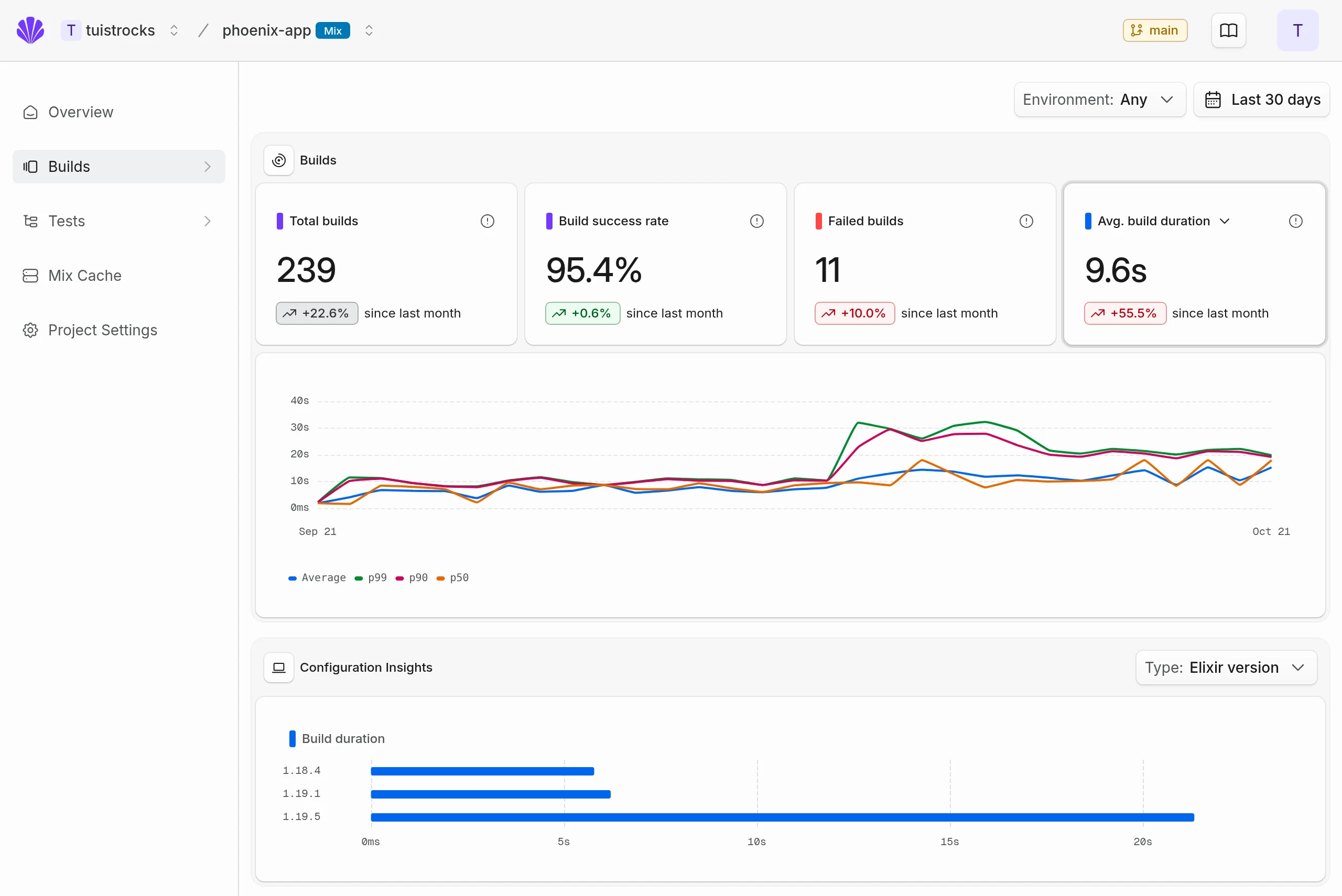
The real Builds dashboard, populated with synthetic data for a Phoenix demo project.
The timeline lets you follow that work alongside type checking, writing modules to disk, and the machine's CPU, memory, network, and disk usage. If the CPU is mostly idle during a long wait, you can look at what the compiler was waiting for. Warnings, errors, and the build's outcome are recorded with it.
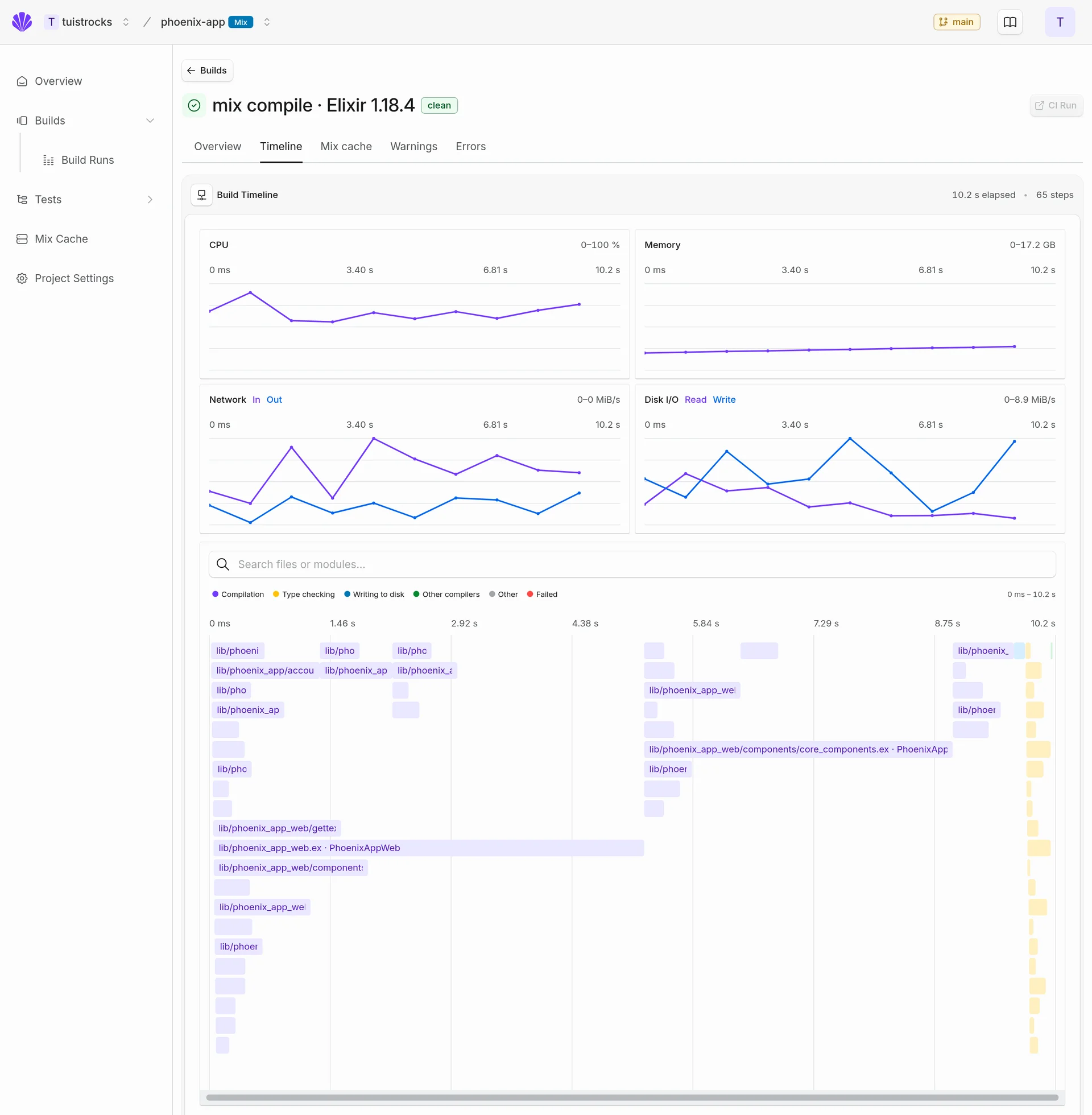
A clean compilation in the same synthetic demo, with file compilation, type checking, and machine metrics on one timeline.
We want agents to be able to investigate this too. Build summaries, including durations, warning and error counts, and cache activity, are already available through the API and our MCP tools. The per-file graph and detailed timeline are currently in the dashboard; we still need to expose those for agents to do the same investigation.
From there, we can connect a file's compilation history with its position in the graph and how often it changes. A frequently edited module that forces half the application to recompile is a different problem from an expensive module that rarely changes. We'd like an agent to identify those cases, suggest a change, and use subsequent builds to check whether it helped.
For now, the Elixir build insights guide covers how to collect the data and explore it yourself. We think it's worth doing before build times become a problem for the team.
Test insights for ExUnit
Tests have a similar problem: the output of one run tells you what happened, but not much about how the suite is changing. Is that test getting slower? Has it failed before with the same code? We collect individual results and durations, including doctests, organized by module and describe block. Failures keep their message and location, so you and your agents can follow them across runs through the dashboard, API, or MCP.
Elixir gives us a good starting point for improving the suite, too. Each ExUnit test runs in its own process. If we avoid shared state, asynchronous test modules can run concurrently, using more of the available cores for CPU-bound work. Databases and external services aren't isolated just because the tests have separate processes, so there's still work to do in how we design them. The test insights guide covers what we collect to help with that work.
Test sharding
Once we know how long the tests take, we can use that information to distribute them across CI runners. ExUnit handles concurrency within one machine; sharding lets us spread the suite across several.
There are already good ways to split a suite. Plausible's CI, for example, uses Mix's built-in partitioning across six runners. Mix sorts the test files and distributes them round-robin, so there's no manual file list to maintain. But an equal number of files doesn't mean an equal amount of work. One runner can still be busy long after the others finish.
Tuist uses historical timings to assign the files instead. You choose how many shards you want, for example with --shard-total 4, or set a target maximum duration per shard and a limit on the shard count. As the suite changes, the plan changes with it. New files get estimates until we have measurements. You shouldn't need to keep moving files around to stop one runner holding up the rest.
We also don't want each runner to compile the same project. Tuist compiles it once, uploads the build, and lets the runners download it and execute their assigned files. Their results appear as a single test run, with each shard's duration available in the dashboard. The sharding guide covers the CI setup, including any database preparation your project needs.
We measured this locally on our own server: successful full-suite runs took 44.4% less wall-clock time with four shards, running the same tests with the same total CPU budget.
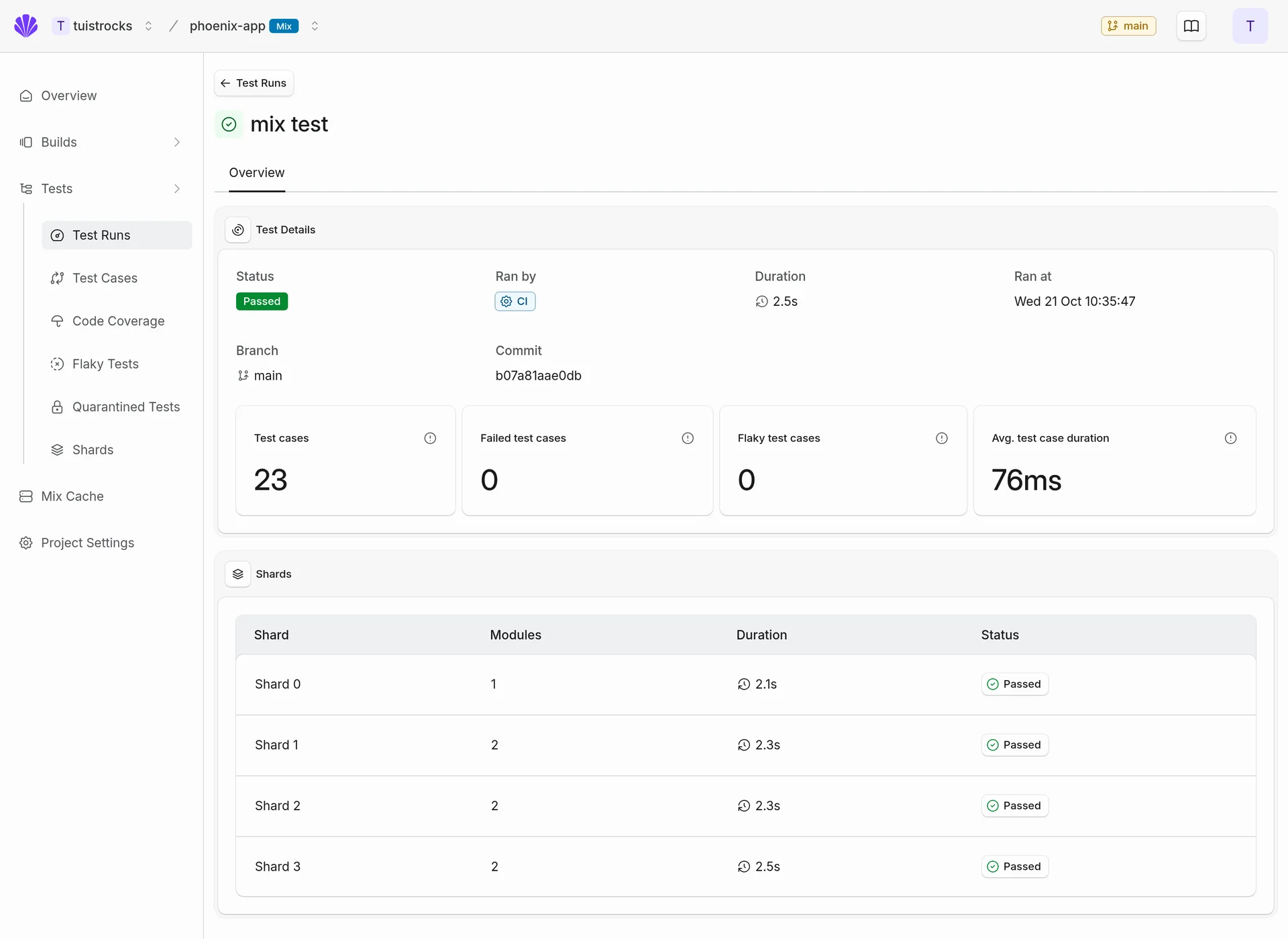
Four shards reported as one test run in the real dashboard, using synthetic data for the Phoenix demo project.
Flaky tests
A faster suite isn't much help if you learn to ignore its failures. When the same test keeps passing on a retry, it's tempting to assume the next red build is just that test again. We want to keep the evidence of that flakiness, even when the retry turns CI green.
Tuist compares passes and failures on the same commit across CI runs. You can also opt in to retries, which report a test that fails and then passes as flaky:
mix test --retries 2
Those attempts stay in the test's history. By default, an automation marks the test itself as flaky after three flaky runs in 30 days. You can change the threshold and recovery window in the project's automation settings, or mark a test manually.
While a fix is in progress, you can quarantine the test from the dashboard. Muting keeps it running and reporting failures, but those failures don't block an otherwise successful, complete run. Skipping leaves it out of the run. You can set either state manually or have an automation do it when a test becomes flaky, then return it to Enabled once you've fixed it.
Quarantine requires authentication, even for public projects. For now, muting doesn't apply with --warnings-as-errors or from an umbrella project's root. Skipping uses a name filter, so it can also exclude a same-named test in another module, and explicit include filters can bring a skipped test back. Those limits matter when deciding how to use it in CI.
Once a test is flagged, you can notify the team through Slack. Or, with an event-capable client and a webhook, use the test_case.marked_flaky event from our MCP Events interface to have an agent investigate its history and failures. We'd like to get to a point where those investigations start without someone having to notice the problem in CI first.
The flaky tests guide covers detection, retries, quarantine, and notifications.
Code coverage
Sharding also changes how we need to collect coverage. Four runners each see only part of the suite. We need to bring those measurements together before saying how much of the code the tests exercised, and make sure restoring compiled code from a cache doesn't leave it out.
Coverage is in early access and needs to be enabled for your account. Once enabled, the package reports it alongside the test results when you run:
mix test --cover
You can inspect the results by file, function, and OTP application. With sharding, enable --cover both when building the shards and when running them. After every job measuring coverage for a commit has finished, a final CI job marks it complete:
mix tuist.coverage.complete
That tells us when to reconcile the reports for the branch's coverage trend. If you deliberately run only part of the suite, we report the coverage as partial. The package's coverage reference covers the setup.
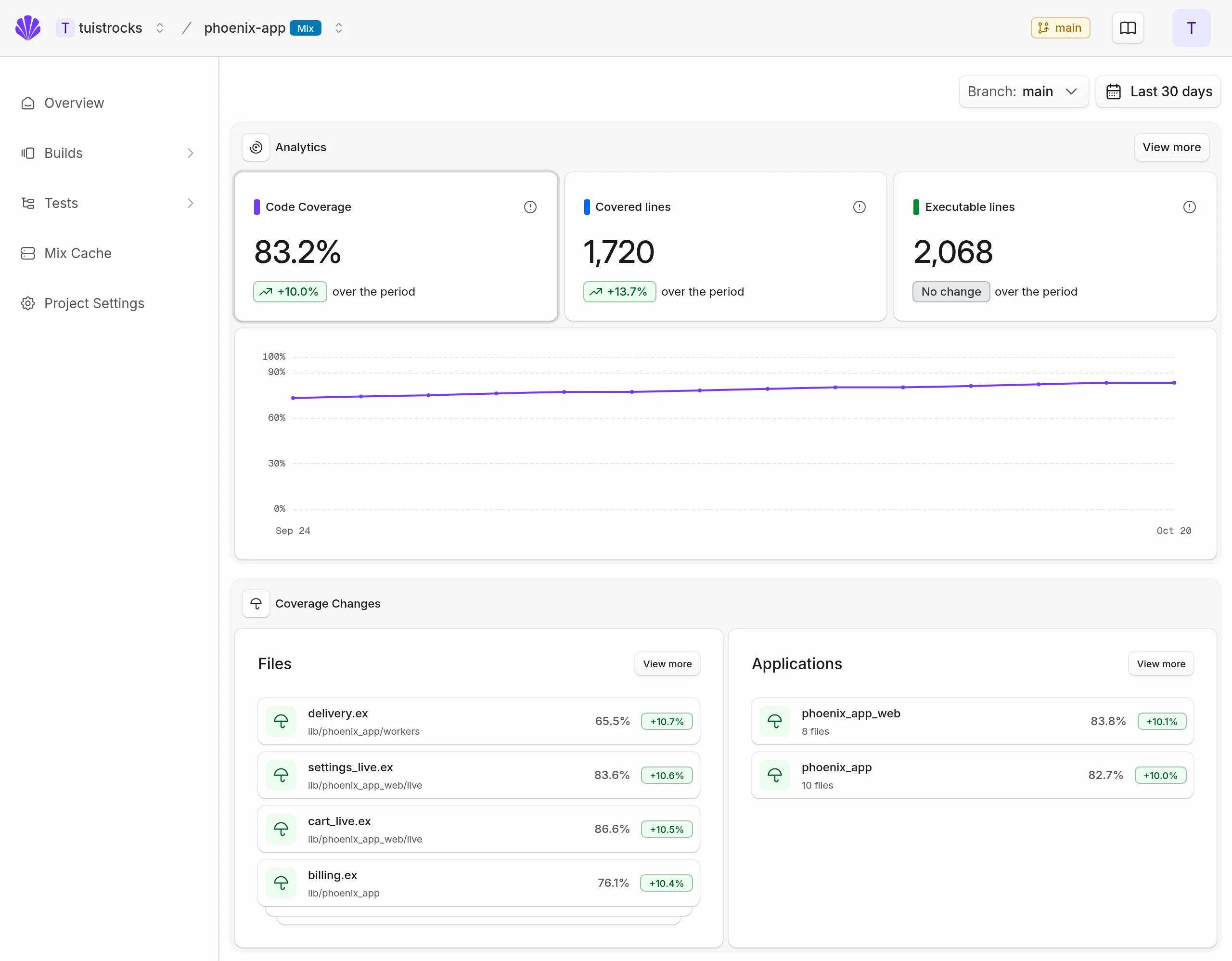
The real Code Coverage dashboard with synthetic data for the Phoenix demo project: coverage over time, and changes across Elixir files and OTP applications.
We're working on selective testing next, using coverage data to understand which tests exercise the code that changed. That would let us run the affected tests instead of the whole suite for every change. It isn't available for Elixir yet, but we hope to let teams try it soon.
Elixir dependency caching
We use a lot of dependencies, and CI keeps compiling the same versions. It feels wasteful, especially when another build has just done that work. But before we reuse a result, we need to know what went into it and what we'd skip by not compiling again.
The same inputs must produce the same outputs, without side effects that the next build still needs. That's what we mean by hermetic compilation. A macro can read an environment variable, a file outside the dependency, the clock, or a network response while compiling. We can't automatically discover all of those reads. If an input changes without us knowing, we might reuse stale code.
We started with dependencies because their resolved versions and sources give us a useful starting point. The cache key also includes upstream compiled dependencies and resources, the toolchain, compiler options, effective application configuration, Mix environment and target, and any additional inputs you declare. The setup above enables caching for supported Hex and Git dependencies using the standard Mix pipeline with Elixir or Erlang sources, and ordinary rebar3 compilation. It doesn't cache your application's own source files.
You'll need to declare additional file and environment inputs where compilation uses them. Dependencies that rely on time, network responses, or side effects that must happen on every build should be excluded. Native and custom builders need an explicit audit and configuration of their build environment, required outputs, and additional inputs. Otherwise they compile normally, as do local dependencies and unsupported dependency chains. Using the standard compiler doesn't, on its own, prove that a dependency is hermetic. The advanced cache guide goes into that in more detail.
When we can reuse a result, Tuist looks locally first, then in the shared remote cache. A miss compiles normally and stores the result for later builds. If the cache or authentication is unavailable, compilation falls back to Mix. You can see the hits, transfers, and recent builds in the Mix Cache dashboard.
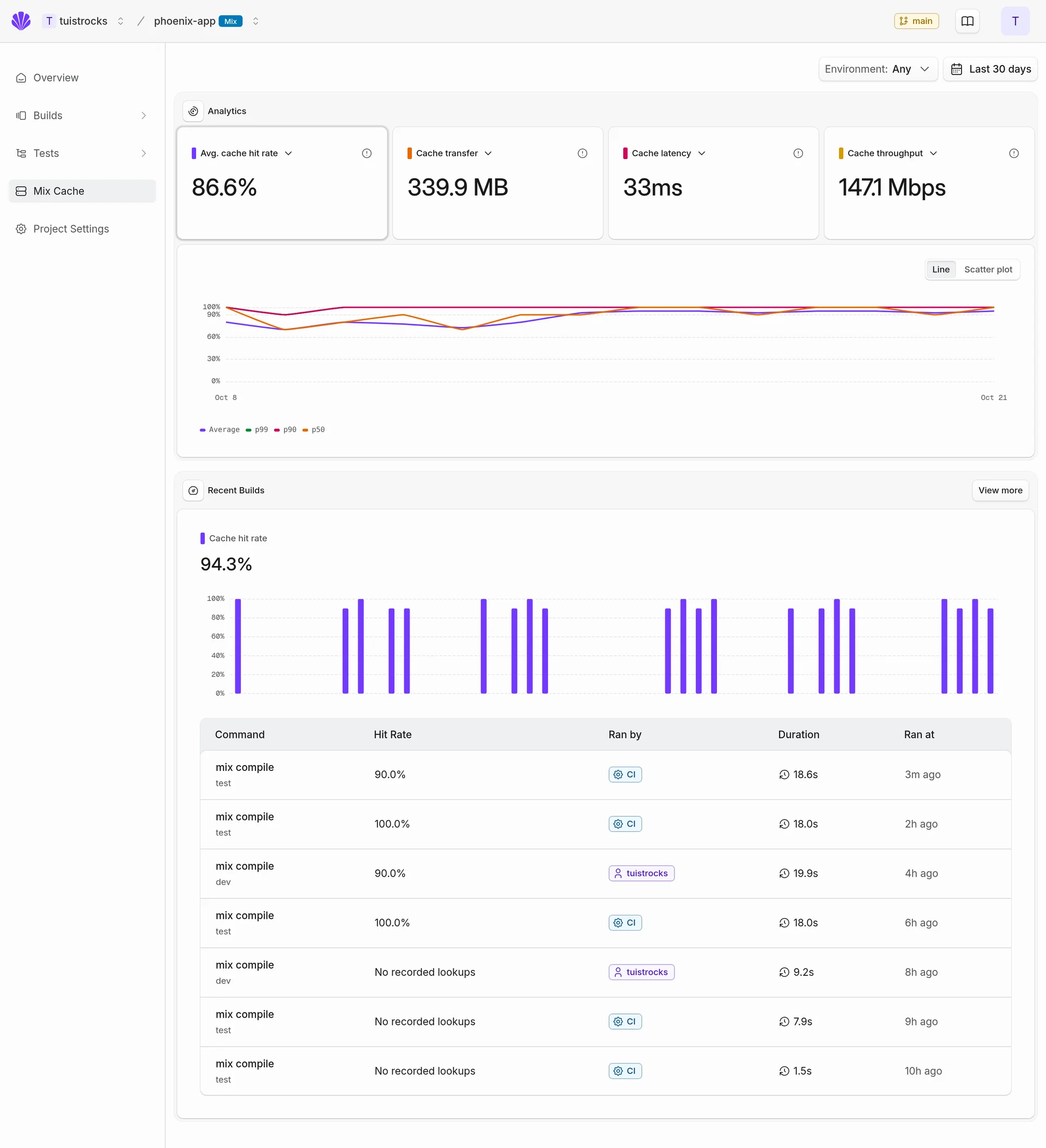
The real Mix Cache dashboard with synthetic client cache observations. These numbers illustrate the interface, not measured performance or savings.
We tried it on our own server: compilation took 33.6% less time with a warm local dependency cache, while still compiling all of our application's own code.
Of course, looking up and downloading compiled code takes time too. That's why we've invested in Kura, our distributed cache infrastructure. It replicates artifacts between cache nodes so builds can fetch them nearby. With our runners, we can place the cache close to the compute and reuse artifacts across jobs. We don't want to save time compiling only to spend it transferring the result. The Elixir cache guide covers getting started.
Giving something back to Elixir
Elixir has given our small team a lot. We get to build and operate software that would be harder for us to manage otherwise. We're thankful for that, and we'd like this work to be useful to the people building alongside us in the ecosystem.
We've been using this integration on our own server for weeks. The Tuist server project is public, so you can look at real build and test data, beyond the synthetic examples in this post. There's also a public project for Livebook you can explore.
If you maintain an open-source Elixir project, our open-source program gives you free access to these build and test features. Send us your repository and Tuist account handle, and we'll help you get set up.
And if you're using Elixir at work, we'd like to hear how your builds and tests are going. Where do you spend time waiting? What have you had to build yourselves? You can book a call with us to talk about it. We have our own experience running Tuist, but there's a lot more for us to learn from yours.