Run your test suite across balanced shards
As your project grows, your test suite execution time does, too. You've already enabled parallel testing, maxed out your CI runner's cores, and there's nothing left to squeeze out of a single machine. Maybe the CPU just can't keep up, or you're limited by the number of simulators you can run in the environment.
This is when most teams reach for the obvious solution: run tests on multiple machines in parallel, also known as sharding. But how you shard matters and this is where Tuist's new sharding becomes really useful.
The sharding problem
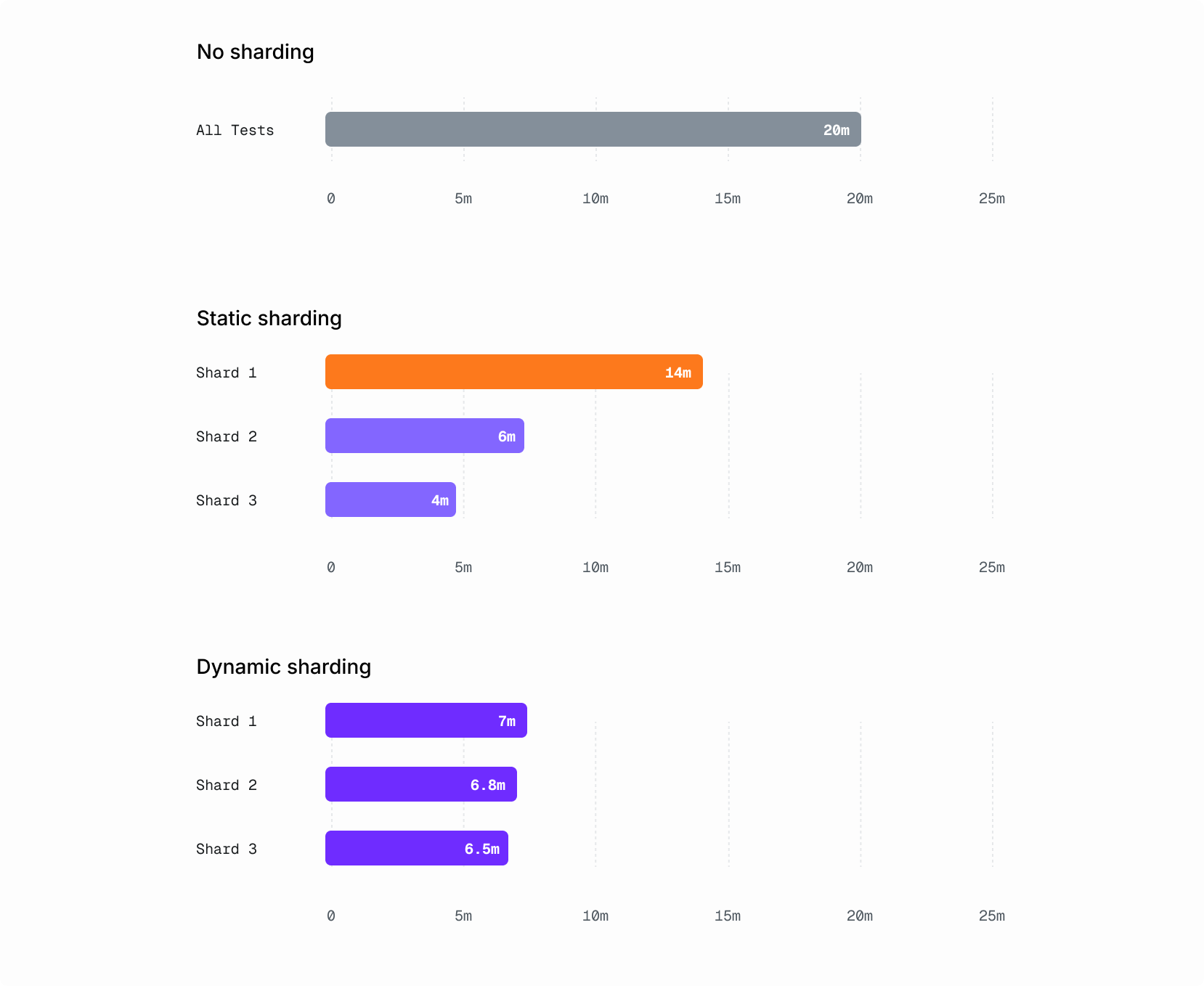
The naive approach is to split tests statically. You decide upfront which tests go where: modules A and B on shard 1, modules C and D on shard 2, and so on. It works at first, but your codebase isn't static. What was a balanced split last month becomes lopsided today, with one shard finishing in 3 minutes while another takes 12. Your CI workflow is only as fast as the slowest shard, so you're waiting on that one overloaded runner while the others sit idle.
Keeping static shards balanced is a maintenance burden that scales with your test suite. Every time the distribution drifts, someone has to manually rebalance. In practice, nobody does until the pain is bad enough to complain about.
Dynamic sharding solves this. Instead of hardcoding the split, you let the system decide how to distribute tests based on how long each one actually takes. Every time you shard, the distribution is recalculated from real data, without you having to constantly balance the shards manually.
Leveraging test insights
For optimal sharding, we leverage our Test Insights to know exactly how long every test module and test suite typically takes to run. So when it's time to shard, we use a bin-packing algorithm that takes historical test durations and assigns tests to shards so each shard runs for roughly the same amount of time.
The algorithm is greedy LPT (Longest Processing Time first): sort all test units by their average duration in descending order, then assign each one to whichever shard currently has the lowest total duration. The result is a balanced distribution that adapts automatically as your test suite evolves.
For tests without historical data (new tests, for example), we estimate their duration using the median of known tests.
How it works
Test sharding follows a two-phase workflow:
- Build phase: A single CI runner builds the tests and uploads the test artifacts (
.xctestproductsfor Xcode and compiled test classes for Gradle) to the Tuist server. The server then creates a shard plan using historical timing data and returns a matrix that your CI uses to spawn parallel runners. - Test phase: Each runner receives a shard index, downloads the pre-built test artifacts, and executes only the tests assigned to its shard. Results are uploaded to Tuist and merged into a single unified view in our dashboard. Here's an example of a sharded test run from the tuist/tuist public dashboard.
This split also opens the door to CI cost savings. The build phase is CPU-intensive and benefits from a beefy machine, but the shard runners only execute pre-built tests. For workloads like UI tests where the CPU isn't the bottleneck, you can use cheaper, less powerful runners for the test phase without affecting execution speed.
Getting started
Here's how an example test sharding workflow looks on GitHub Actions with tuist xcodebuild:
# GitHub Actions
jobs:
  build:
    runs-on: macos-latest
    outputs:
      matrix: ${{ steps.build.outputs.matrix }}
    steps:
      - uses: actions/checkout@v4
      - uses: jdx/mise-action@v2
      - run: tuist auth login
      - id: build
        run: |
          tuist xcodebuild build-for-testing \
            -scheme MyScheme \
            -destination 'platform=iOS Simulator,name=iPhone 16' \
            --shard-total 5

  test:
    needs: build
    runs-on: macos-latest
    strategy:
      fail-fast: false
      matrix:
        shard: ${{ fromJson(needs.build.outputs.matrix).shard }}
    env:
      TUIST_SHARD_INDEX: ${{ matrix.shard }}
    steps:
      - uses: actions/checkout@v4
      - uses: jdx/mise-action@v2
      - run: tuist auth login
      - run: |
          tuist xcodebuild test \
            -scheme MyScheme \
            -destination 'platform=iOS Simulator,name=iPhone 16'
Test sharding also works with Tuist generated projects via tuist test and Gradle projects using the Tuist Gradle plugin. For generated projects, sharding integrates seamlessly with selective testing as shard runners don't need to generate the project, install dependencies, or compile anything since the selective testing graph is persisted during the build phase. See the test sharding documentation for full setup details.
Stop waiting
Your test suite will keep growing, now more than ever. The question is whether your CI grows with it or becomes the bottleneck. Static sharding is a temporary fix that creates its own maintenance burden, while Tuist's dynamic sharding adapts automatically, stays balanced, and seamlessly integrates with other features, like test insights.
Have questions or feedback? Reach out in our community forum or send us an email at [email protected].