ქეში

გადაამუშავეთ ბილდის არტეფაქტები თქვენს გუნდსა და CI-ში ერთნაირი კოდის ხელახალი კომპილაციის თავიდან ასაცილებლად

გამოთვლა

გაუშვით რანერები წამებში და დაამასშტაბირეთ თქვენს გუნდთან და აგენტებთან ერთად

ტესტები

შეამოწმეთ მხოლოდ ის, რაც შეიცვალა და ავტომატურად აღმოაჩინეთ არასტაბილური ტესტები

Previews

გაუზიარეთ თქვენი აპლიკაცია მყისიერად URL-ით — დააჭირეთ და გაუშვით ნებისმიერ მოწყობილობაზე

შექმნილი პროექტები

გაამარტივეთ მოდულური Xcode პროექტები უფრო მარტივი შენარჩუნებისა და მასშტაბირებისთვის

რეგისტრი

ჩამოტვირთეთ მხოლოდ ის, რაც გჭირდებათ — უფრო სწრაფი და მსუბუქი ბილდები ადგილობრივად და CI-ზე

შესახებ

გაიგეთ მეტი Tuist-ის შესახებ და გაეცანით გუნდს

საჯარო დაფა

გაეცანით Tuist-ის ფუნქციებს საჯარო დაფაზე

მომხმარებლები

ნახეთ, როგორ ზრდიან წამყვანი გუნდები პროდუქტიულობას Tuist-თან ერთად

Slack

შეუერთდით საზოგადოების Slack-ს

ნიუსლეტერი

იყავით ინფორმირებული - გამოიწერეთ ჩვენი სიახლეები

GitHub

ჩვენს წყაროები, საკითხები და PR-ები

საზოგადოების ფორუმი

შეუერთდით დისკუსიებს და გაუზიარეთ იდეები ჩვენს საზოგადოების ფორუმზე

Tuist reports on Cursor Origin pull requests

Tuist now connects to native Cursor Origin repositories. Build results, test failures, flaky tests, app previews, and bundle-size changes appear together in a Tuist Run Report on the pull request. As more results arrive, Tuist updates the same comment instead of adding another notification.
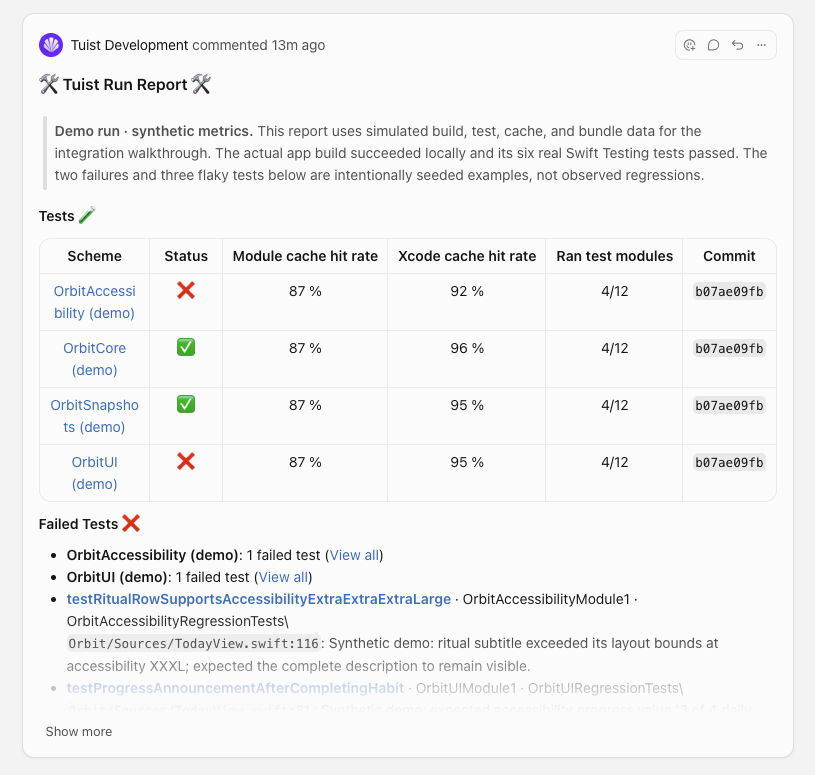
The Tuist Development app posting a Run Report on an Origin pull request, with test results, cache hit rates, and failure diagnostics

The screenshot uses explicitly labeled demo data to illustrate the report.

To get started, open your Tuist account's Settings → Integrations, choose Connect under Origin, and approve repository access in Cursor. Then choose Add new project connection to link a Tuist project to one of the connected account's native repositories.

Your existing build and test workflows continue uploading results to Tuist. Installing the Origin app does not run those workflows or require access to your source code. GitHub mirrors continue using the GitHub integration, and results for superseded pull request commits do not overwrite the current report.

See the Origin integration guide for setup, result-upload requirements, and self-hosted configuration.