Tuist now connects to native Cursor Origin repositories. Build results, test failures, flaky tests, app previews, and bundle-size changes appear together in a Tuist Run Report on the pull request. As more results arrive, Tuist updates the same comment instead of adding another notification.
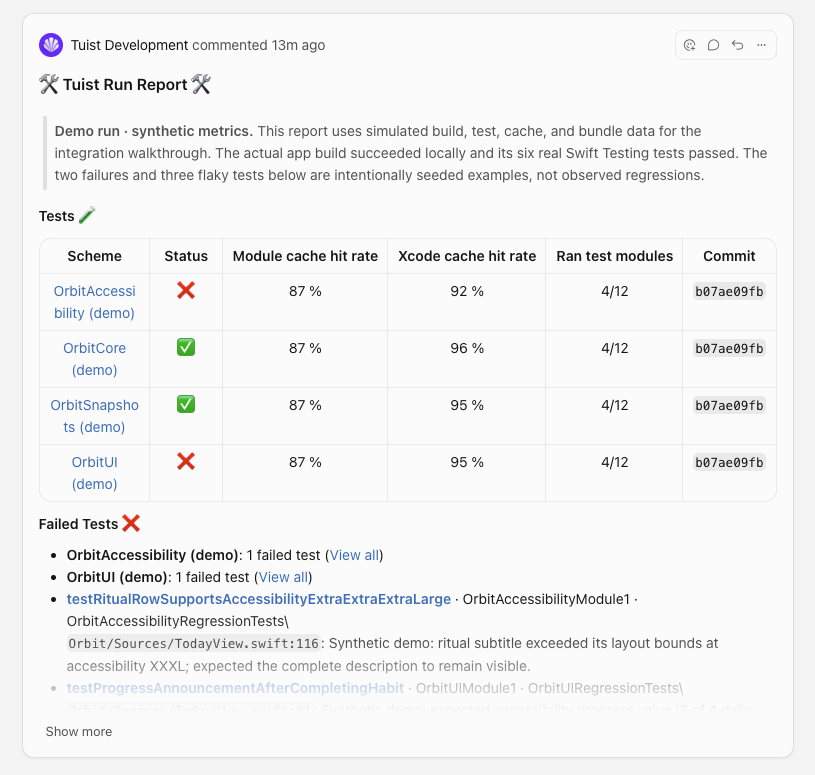
The screenshot uses explicitly labeled demo data to illustrate the report.
To get started, open your Tuist account's Settings → Integrations, choose Connect under Origin, and approve repository access in Cursor. Then choose Add new project connection to link a Tuist project to one of the connected account's native repositories.
Your existing build and test workflows continue uploading results to Tuist. Installing the Origin app does not run those workflows or require access to your source code. GitHub mirrors continue using the GitHub integration, and results for superseded pull request commits do not overwrite the current report.
See the Origin integration guide for setup, result-upload requirements, and self-hosted configuration.